an unexpected error has occurred while loading the application plug-ins - Trados studio 2021

I have no idea, which plugins is the culprit. A few days ago I was prompted to update SDL Language Cloud ?

I have to add actually that at least the plugins I use all the time "Antidote Verifier" and "Xbench" are no longer available in my Studio

I got to catch the error message, see below

System.10.FileFormatException, WindowsBase, Version=4.0.0.0, Culture= neutral, PublicKeyToken=31b8856ad364e35

Parents
  • Hello ,

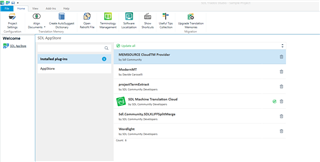
    I would first suggest removing the plugins before reinstalling.

    Trados Studio Add-Ins window showing installed plugins including 'MEMsource Cloud' and 'SDL Machine Translation Cloud'.

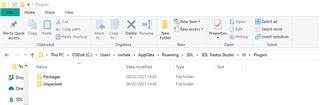
    And also check (just in case) that they have been removed from the Plugins folder

    File Explorer window with the path 'C: > Users > Username > AppData > Roaming > SDL > SDL Trados Studio > 15 > Plugins' showing 'Packages' and 'Unpacked' folders.

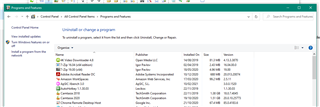
    Now restart Studio and install the plugins one by one and ensure any applications are removed from Control Panel/Programs and Features

    Control Panel's 'Programs and Features' window listing installed programs for potential removal.

    Please let us know if this helps.

    Oana Nagy | QA Engineer | RWS Group

    emoji


    Generated Image Alt-Text
    [edited by: Trados AI at 1:03 AM (GMT 0) on 29 Feb 2024]
  • Steven,

    I have fixed my issue by loading a saved image of my hard drive from Feb 06.

    I came back to where I was and I had no issue with the plugins. At this time, which was before  I was prompted to update SDL Language Cloud plugin.

    Therefore running with the working image from Feb 06, I was prompted again and updated the SDL Language Cloud plugin after creating a Restore point to be safe..

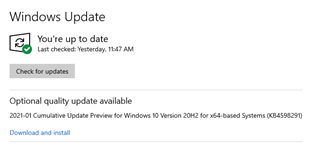
    All was fine with this update and now, I am again facing the question to run the KD4598291 Windows update, which I have done the day before and got the issue "an unexpected error has occurred while loading the application plug-ins"

    I will wait for another time to do this and I am assuming that is is not a safe update ?

    Does anyone has run the KD4598291 WIndows 2021-01 update ?

    Windows Update screen showing 'You're up to date' with an optional quality update available labeled '2021-01 Cumulative Update Preview for Windows 10 Version 20H2 for x64-based Systems (KB4598291)' with a 'Download and install' button.

    emoji


    Generated Image Alt-Text
    [edited by: Trados AI at 1:03 AM (GMT 0) on 29 Feb 2024]
Reply
  • Steven,

    I have fixed my issue by loading a saved image of my hard drive from Feb 06.

    I came back to where I was and I had no issue with the plugins. At this time, which was before  I was prompted to update SDL Language Cloud plugin.

    Therefore running with the working image from Feb 06, I was prompted again and updated the SDL Language Cloud plugin after creating a Restore point to be safe..

    All was fine with this update and now, I am again facing the question to run the KD4598291 Windows update, which I have done the day before and got the issue "an unexpected error has occurred while loading the application plug-ins"

    I will wait for another time to do this and I am assuming that is is not a safe update ?

    Does anyone has run the KD4598291 WIndows 2021-01 update ?

    Windows Update screen showing 'You're up to date' with an optional quality update available labeled '2021-01 Cumulative Update Preview for Windows 10 Version 20H2 for x64-based Systems (KB4598291)' with a 'Download and install' button.

    emoji


    Generated Image Alt-Text
    [edited by: Trados AI at 1:03 AM (GMT 0) on 29 Feb 2024]
Children