Cannot get any "Editor > Termbase search" keyboard shortcut to work in SDL Trados Studio 2019

I am trying to assign a keyboard shortcut to the "Termbase Search" action in the Editor window, and nothing works, no matter what key combination through the options. What am I doing wrong? How do I get this to work? This is an action I have to perform incredibly often, and I am really tired of wasting time having to click on the termbase search tab, then click in the search box, then type in the term, then press enter, then click back into the segment to continue to work, when I should be able to just highlight the term by double-tapping it and press a key combo to get the results. Can someone tell me how to configure this keyboard shortcut so it works? Many thanks!

Parents
  • I'm afraid this won't work.  We have had a long standing problem with keyboard shortcuts, especially around terminology, and in 2019 the problem still exists.

    I tested in 2021 out of curiosity and the shortcut does work... although it doesn't really do the obvious which is to actually run the search based on the word selected.  But it does at least get you into the search box if you add a custom shortcut.

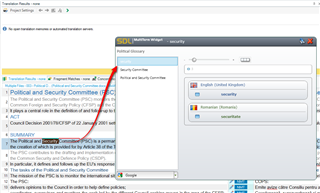
    I had a play to see if I could find a way to automate a search in 2019 some other way but failed.  One possible workaround I suppose would be to use the MultiTerm widget.  This is installed with MultiTerm if you selected it when you installed.  You can set a keyboard shortcut for this and it will look up text when you use the shortcut, like this:

    Screenshot of Trados Studio with the MultiTerm widget open, showing a search for the term 'security' with results displayed.

    It's a bit clunky but it might help?

    And you may find this tool useful on the appstore:

    https://appstore.sdl.com/language/app/tb-scout-v2-0-the-sdl-multiterm-explorer/773/

    I'm sure the developer, , would be only too pleased to explain to you how this could help.

    Paul Filkin | RWS

    Design your own training!
    You've done the courses and still need to go a little further, or still not clear? 
    Tell us what you need in our Community Solutions Hub

    emoji


    Generated Image Alt-Text
    [edited by: Trados AI at 1:08 AM (GMT 0) on 29 Feb 2024]
Reply
  • I'm afraid this won't work.  We have had a long standing problem with keyboard shortcuts, especially around terminology, and in 2019 the problem still exists.

    I tested in 2021 out of curiosity and the shortcut does work... although it doesn't really do the obvious which is to actually run the search based on the word selected.  But it does at least get you into the search box if you add a custom shortcut.

    I had a play to see if I could find a way to automate a search in 2019 some other way but failed.  One possible workaround I suppose would be to use the MultiTerm widget.  This is installed with MultiTerm if you selected it when you installed.  You can set a keyboard shortcut for this and it will look up text when you use the shortcut, like this:

    Screenshot of Trados Studio with the MultiTerm widget open, showing a search for the term 'security' with results displayed.

    It's a bit clunky but it might help?

    And you may find this tool useful on the appstore:

    https://appstore.sdl.com/language/app/tb-scout-v2-0-the-sdl-multiterm-explorer/773/

    I'm sure the developer, , would be only too pleased to explain to you how this could help.

    Paul Filkin | RWS

    Design your own training!
    You've done the courses and still need to go a little further, or still not clear? 
    Tell us what you need in our Community Solutions Hub

    emoji


    Generated Image Alt-Text
    [edited by: Trados AI at 1:08 AM (GMT 0) on 29 Feb 2024]
Children
No Data