"The document cannot be processed since it contains unexpected contents" with xml files

Hi.

Trados studio version: 2017 SR1 - 14.1.10018.54792

I'm starting a new project made up of several xml files with custom file type. Only one file returns the error: The document cannot be processed since it contains unexpected contents.

 I have previewed the file, and there are empty segments in it.
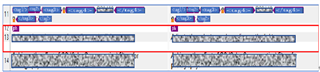
Screenshot of Trados Studio showing XML file with empty segments highlighted in red, indicating an error due to unexpected contents.

The ph tag is <ph outputclass="break">, and the rule is the following setting.
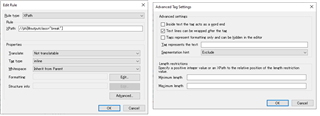
Screenshot of Trados Studio's 'Edit Rule' dialog box with segmentation hint set to 'Exclude' for the ph tag with outputclass 'break'.

I think the ph tag should be outside of the segment(external tag), but it appears in the segment. And, it causes the empty segment so the error occurs.

Although the ph tag exists in other files but they are OK.

If I change the segmentation hint to "Include", the error doesn't occur, but I don't want to change it if possible because this affects the TM match rate.


Is there a way to solve this?


Thanks.


Generated Image Alt-Text
[edited by: Trados AI at 1:10 AM (GMT 0) on 29 Feb 2024]

emoji
Parents Reply Children
  • Hi, Paul

    Thank you for your reply.

    I have created a xml sample file that is the following.

    <?xml version="1.0" encoding="utf-8"?><task id="TP0001653149">
    <taskbody>
      <example>
        <tag_md formula="filter" id="dl0007">
          
          <p><tag_ma global="False" href="" id="as0027" idref="AS0000124288" placement="inline" /><b><uicontrol><tag_mc id="cs0035" idref="CS0000622725" table_id="TT0000003896">S39449</tag_mc></uicontrol>:</b> <ph outputclass="break" /> This is text1. This is text2 (Color A) in this line.</p>
          
        </tag_md>
        <p><tag_ma global="False" href="" id="as0032" idref="AS0000124287" placement="inline" /><b><uicontrol><tag_mc id="cs0043" idref="CS0000622643" table_id="TT0000003896">S39024</tag_mc></uicontrol>:</b> <ph outputclass="break" /> This is text3.
        <tag_md formula="WB_custom123" id="dl0014">
          
          <ph outputclass="break" /> This is text4.
          
        </tag_md>
        </p>
      </example>
    </taskbody>
    </task>

    My custom file type setting is the following.I couldn't upload the .sdlftsettings file, so I uploaded the XML file with the file type setting.

    FileTypeSetting .sdlftsettings.xml

    I created the project with Default template, no memories, and the task sequence is Prepare without project TM.

    Are these information sufficient?

  • Thanks

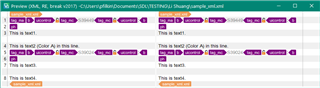
    I tested in 2021 using your custom filetype and see this:

    Screenshot of Trados Studio 2021 showing correct segmentation with custom filetype rules applied.

    In 2017 I have this as you do:

    Screenshot of Trados Studio 2017 displaying incorrect segmentation not honoring the exclude segmentation hint.

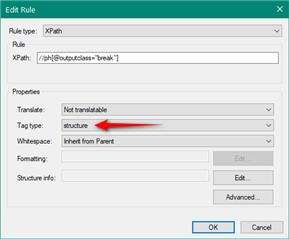
    If I change your ph rule to structure as opposed to inline I do see this:

    Screenshot of Trados Studio 2021 with changed ph rule to structure, resulting in correct segmentation.

    Edit Rule dialog box in Trados Studio with the Tag type set to 'structure' and Translate option set to 'Not translatable'.

    It looks to me as though 2017 is not honouring the segmentation hint where you set this to exclude, but 2021 is.  We won't be changing 2017 now as it's too old, but perhaps making this rule structural will achieve what you want?

    Paul Filkin | RWS

    Design your own training!
    You've done the courses and still need to go a little further, or still not clear? 
    Tell us what you need in our Community Solutions Hub

    emoji


    Generated Image Alt-Text
    [edited by: Trados AI at 1:10 AM (GMT 0) on 29 Feb 2024]
  • Hi, Paul

    Thank you for your advice.

    It seems to work fine and my other files are also OK.

    Thank you very much.