
 Translate



I had issues with Studio 2021 Win7 (it kept crashing), so I have installed Win10 and it keeps crashing anyway.
I have two issues, actually: I deactivated my license in Win7, installed Win10, installed Studio 2021 and now I get a 'Timeout' error when I enter my activation key. The SDL cloud access works fine, though. In my SDL account I see I have one available license, so I don't see the issue here.
Anyway, since I am in a hurry, I am okay with working with the 30-day trial for now. This brings me to my original issue (SDL crashing).
Starting from the very beginning in Win7 and Studio 2021:
I was working on this project that was created by aligning to Word files in Studio. From Alignment I had generated a TM and a bilingual (*.sdlxliff) file. I created a project with the bilingual file and started working normally until 33%. At that point, Studio kept crashing when I confirmed the next segment.
I tried to confirm a different segment, and it kept crashing (just a little later), and after several SDL restarts, I got an error message saying it was impossible to locate the *.sdlxliff file). How odd! I went to the target folder and I found out that the filename was changed appending _901989, which explained why Studio wasn't finding the file. I removed the _901989 and the file opened again.
At a certain point, I was getting this error and I logged a ticket with SDL.
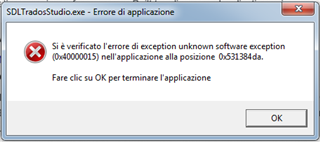
So I have decided to install Win10 (clean install from scratch, after I deactivated my Studio license successfully).
Installed Win10, downloaded and installed Studio 2021 and Multiterm 2021. Opened the older project but it keeps happening: as soon as I confirm a segment (any segment), Studio crashes with no error message this time.
Well, I thought the issue may be a corrupted *.sdlxliff file resulting from alignment, so I decided to translate the source Word from scratch. A new project is created, I add the source Word file for translation, the TMs and TB applied, the file opens. But again, after a few seconds, when I confirm a segment Studio crashes.
I have restarted the damn thing 20 times already and I don't know what to do at this point.
Generated Image Alt-Text
[edited by: Trados AI at 1:06 AM (GMT 0) on 29 Feb 2024]

