Bug in Studio 2019 SR 2 15.2.8.3007 - Import option does not work

Hi,

We would like to report a bug in the new release (Studio 2019 SR 2 15.2.8.3007).

We are facing multiple issues while consolidating our TMs using XLIFFs/TMX using import option.

Here are some of the issues we are facing after updating the latest release:

  • Unable to import xliff/ TMX for consolidation – Blocking error for some team members
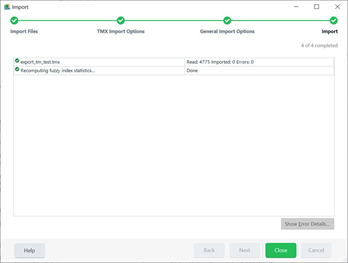
  • Some users were able to convert XLIFFS into TMX and then import this TMX to our existing TM but 0 units were added
  • Some team members were able to import xliffs into the existing TM but 0 units were added


Basically, the import option is not functioning in the latest release. The team members who are yet to update their Trados versions are not facing these issues.

Here are some screenshots for reference:
 

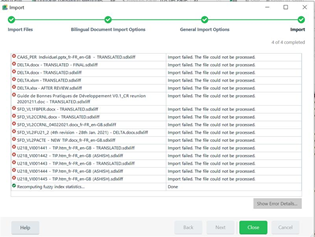
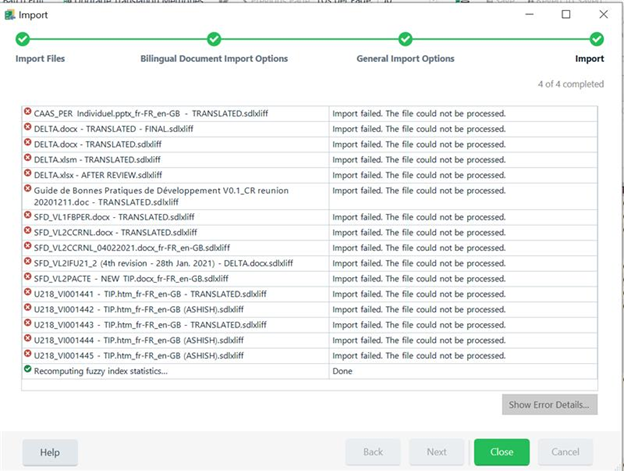
 Trados Studio import window showing 'Recomputing fuzzy index statistics... Done' with no errors indicated.Trados Studio import error window listing multiple files with 'Import failed. The file could not be processed' error for each.


Generated Image Alt-Text
[edited by: Trados AI at 1:09 AM (GMT 0) on 29 Feb 2024]

emoji
Parents
  • I'm afraid this post needs more information to be able to support you.

    1. the screenshots are illegible... too small
    2. you need to provide an XLIFF/TMX for us to check
    3. you need to confirm if you can import these into a clean, new SDLTM, or if this is only a problem with importing into some existing TM?
    4. you need t confirm if you are importing into a file-based TM or a server-based TM?

    Paul Filkin | RWS

    Design your own training!
    You've done the courses and still need to go a little further, or still not clear? 
    Tell us what you need in our Community Solutions Hub

  •  Hello Paul,

    I have re-uploaded the screenshots. As a translation team, we do the TM consolidation every month and we have had no issues until now. This month some users got errors (they had updated their trados recently) and we asked other users to try importing the same set of xliffs/TMX and found that users with previous versions were able to do it without any error and it failed only for users who updated their trados to the new version. We are importing file-based TMs.

    Due to confidentiality issues, we are unable to share the xliffs/TMX but I can confirm that we could reproduce the import error in every user who had the latest version. These users were able to export their XLIFFs into TMX but importing TMX into an existing TM failed. However, we were able to import into a blank/SDL TM. As seen in the screenshot below, the “show error details button” was greyed out for these users. Initially, we thought it was file-specific problem or due to corrupt TM and retried TM consolidation using the previous month’s backup (which was successful for these same users for the same set of files and TM last month) but it failed for them this time.

    In fact, for one of the users who faced this issue, we uninstalled Trados and installed the previous version and import is working fine for him now. Please let me know if you need more details.

    Trados Studio import error screenshot showing multiple files with 'Import failed. The file could not be processed.' error messages and a greyed out 'Show Error Details' button.

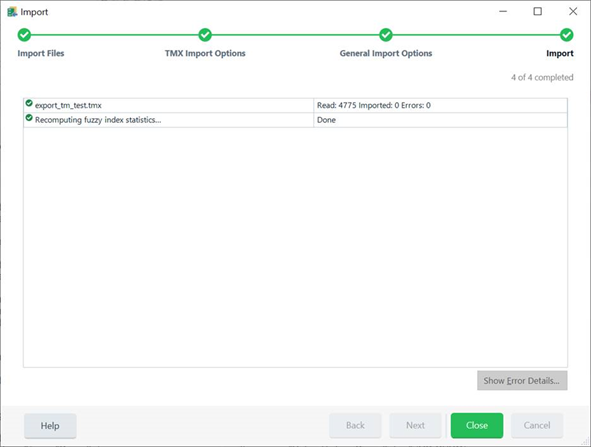
    Trados Studio import success screenshot showing a single TMX file imported with 'Read: 4775 Imported: 0 Errors: 0' message and an active 'Show Error Details' button.

    Thanks,

    Maharasi

    emoji


    Generated Image Alt-Text
    [edited by: Trados AI at 1:09 AM (GMT 0) on 29 Feb 2024]
Reply
  •  Hello Paul,

    I have re-uploaded the screenshots. As a translation team, we do the TM consolidation every month and we have had no issues until now. This month some users got errors (they had updated their trados recently) and we asked other users to try importing the same set of xliffs/TMX and found that users with previous versions were able to do it without any error and it failed only for users who updated their trados to the new version. We are importing file-based TMs.

    Due to confidentiality issues, we are unable to share the xliffs/TMX but I can confirm that we could reproduce the import error in every user who had the latest version. These users were able to export their XLIFFs into TMX but importing TMX into an existing TM failed. However, we were able to import into a blank/SDL TM. As seen in the screenshot below, the “show error details button” was greyed out for these users. Initially, we thought it was file-specific problem or due to corrupt TM and retried TM consolidation using the previous month’s backup (which was successful for these same users for the same set of files and TM last month) but it failed for them this time.

    In fact, for one of the users who faced this issue, we uninstalled Trados and installed the previous version and import is working fine for him now. Please let me know if you need more details.

    Trados Studio import error screenshot showing multiple files with 'Import failed. The file could not be processed.' error messages and a greyed out 'Show Error Details' button.

    Trados Studio import success screenshot showing a single TMX file imported with 'Read: 4775 Imported: 0 Errors: 0' message and an active 'Show Error Details' button.

    Thanks,

    Maharasi

    emoji


    Generated Image Alt-Text
    [edited by: Trados AI at 1:09 AM (GMT 0) on 29 Feb 2024]
Children