Concordance search provides higher fuzzy results than translation results window

I have had this situations several times now and other have too, so it seems worth investigating what we do wrong :-):

I have the segment Plug in to translation. 

The TM has a "UsedIn" field for the product assingment, and the project has a filter with a penalty of 5 for TM entries that do not have the current "UsedIn" value (let's call it product C).
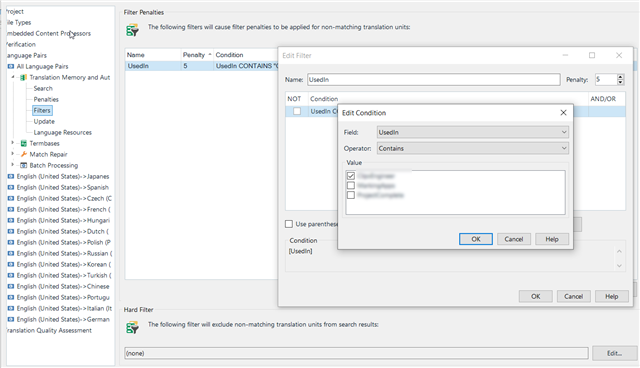
Screenshot of Trados Studio filter penalties settings showing a penalty for non-matching 'UsedIn' field values with a condition set to 'Contains'.

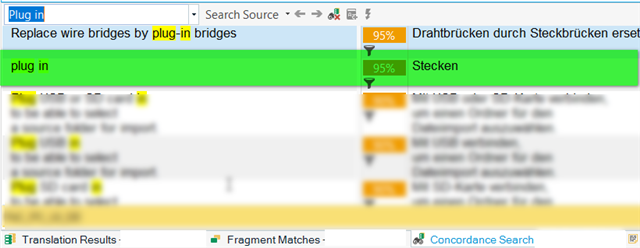
Now, the translation results window displays a segment with a 70% match which is Plug and belongs to product i.e. UsedIn entry) A , the concordance search window displays the almost correct term plug in, which has a 95% match but belongs to product B.
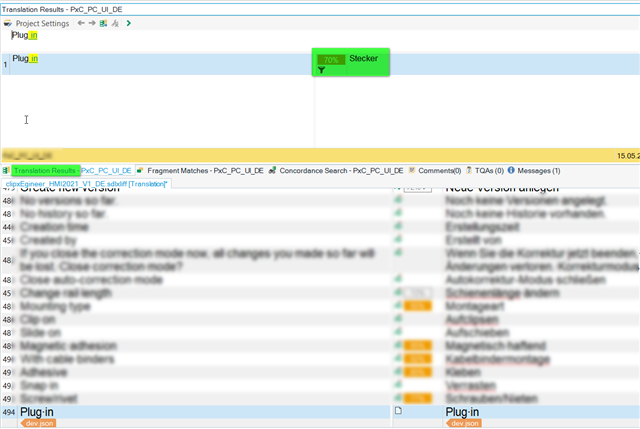
Screenshot of Trados Studio translation results window displaying a 70% match for the segment 'Plug in' with a sticker indicating it belongs to product A.

Screenshot of Trados Studio concordance search window showing a 95% match for the term 'plug in' associated with product B.

I have the gut feeling that there is a setting somewhere deep that sort of gives entries for UsedIn = A priority over entries with UsedIn = B...? (The first entry in the concordance search field is also from product A..)

Is there something like that somewhere? If not, where could I start looking for a solution?

Thank you :-)

yve


Generated Image Alt-Text
[edited by: Trados AI at 1:25 AM (GMT 0) on 29 Feb 2024]
emoji
  • I confess to being a bit confused by this question.  The title seems to question why a concordance search provides higher fuzzy results than translation lookup in the translation results window.  The answer to this part would be that you cannot compare these two things as they are match values based on completely different things.  The translation lookup is comparing the entire string whilst the concordance is looking for a match (potentially) within a string.

    But I'm not convinced this is what you mean.  Apologies for my lack of understanding here... perhaps you could explain a different way?

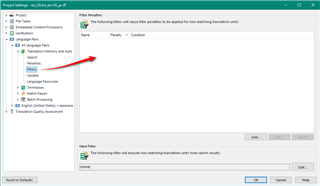
    One thing you might mean is that you do seem to be applying a filter because of the little funnel symbol. Perhaps this is what you mean and you can find the settings for that here in your project settings:

    Screenshot of Trados Studio project settings window with a red arrow pointing to the filter symbol indicating an active filter in the translation units.

    Paul Filkin | RWS

    Design your own training!
    You've done the courses and still need to go a little further, or still not clear? 
    Tell us what you need in our Community Solutions Hub

    emoji


    Generated Image Alt-Text
    [edited by: Trados AI at 1:25 AM (GMT 0) on 29 Feb 2024]