 Translate



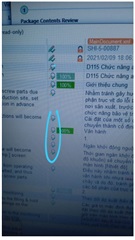 and how to make it?
Generated Image Alt-Text
[edited by: Trados AI at 1:17 AM (GMT 0) on 29 Feb 2024]


and how to make it?
Hello Ray Nugraha,
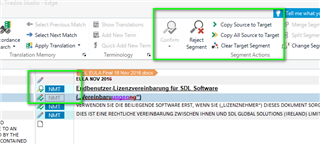
These symbols mean that the translation has been 'approved by a reviewer' or if the file has been opened from the projects view- Open for review
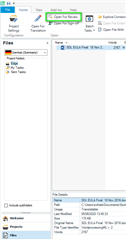
In Editor mode you will then see the following-
Oana Nagy | QA Engineer | RWS Group

In short these icons mean that particular segment means Translation Approved, typically as part of a review process.
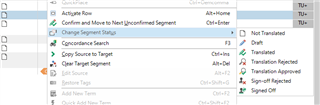
As you can see in the screen print attached (menu of which I got from right clicking in segment), there are other segment status that could fall part of the project files life cycle.
Definitions around these segment status can be seen here: https://docs.sdl.com/813470/575898/sdl-trados-studio-2021-sr1/segment-status-column
A tip if I may. It is useful to use the advanced display filter so that if you want to focus on certain segments based on status, you can filter accordingly.
The easiest is to use the Advanced Display filter which you can find on the right hand side of the Editor view
*If you still dont see the Advanced Display filter, please try a UI rest by going to the tool bar -> View -> Rest
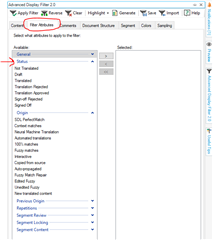
I hope this gives you clarification and ongoing support
Lydia
Oana Nagy | QA Engineer | RWS Group

