 Translate



Studio 2019を使用しています。
エディタで訳文を入力しようとすると自動的にTM検索画面が広がって作業したいセグメントが隠れてしまうのはなぜでしょうか。
大変わずらわしいのですが。
Akiko Ishida

Studio 2019を使用しています。
エディタで訳文を入力しようとすると自動的にTM検索画面が広がって作業したいセグメントが隠れてしまうのはなぜでしょうか。
大変わずらわしいのですが。
Akiko Ishida
I'm not sure I fully understand you, but perhaps you just need to dock the TM results window into place instead of having it set to fly in and out? Is that what you mean?
Paul Filkin | RWS
Design your own training!
You've done the courses and still need to go a little further, or still not clear?
Tell us what you need in our Community Solutions Hub

Hi Paul
Thanks for your advice and so sorry for my failure to respond earlier. I have been away from Trados for a while. I wounder you could tell me how specifically I can "dock the TM results window into place instead of having it set to fly in and out"? If I want to check if there is a TM for some word, I copy the word and click the binocular mark and paste it in the search window, then TM results will extend covering a large part of the editor window. I wonder what key I can press to do that....
Thank you.
Akiko Ishid

Hello Akiko Ishida,
If the TM results keeps flying in and out- simply dock this in place as follows.
Click on the window and then on the right side, you will see the little 'pin' icon- click this
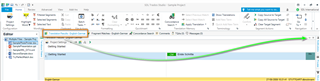
This now 'pins' the window in place-
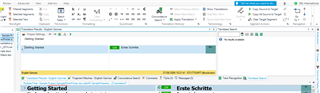
and you can easily switch between Translation Results and Concordance.
If however you want the TM results window set else where-
Click (and hold) into the 'TM results' windows and drag to a more suitable location.
Oana Nagy | QA Engineer | RWS Group

