Target font issues after upgrading to SDL Trados Studio 2021 SR1 - 16.1.4.4184

Hi,

I recently upgraded my SDL Trados studio 2021 to the latest version ( SR1 - 16.1.4.4184).
Since then, when tags are applied to the target text, it becomes unreadable (characters are separated)
Target Language: Persian

Screenshot of SDL Trados Studio showing English source text and Persian target text with tags applied, resulting in separated characters and unreadable text.


Generated Image Alt-Text
[edited by: Trados AI at 1:34 AM (GMT 0) on 29 Feb 2024]

emoji
Parents Reply Children
  • Here you can see an example of separated characters:

    Persian sentence (before the update)

    "سلام. اسم من آریا است"


    Persian sentence (after the update)


    "س‌ل‌ام. ا‌س‌م م‌ن آ‌ر‌ی‌ا اس‌ت"


  • Thanks for the additional detail.  Given these are only formatting tags can you ignore them altogether and simply don't insert them?  They are not required to be able to save the target document.

    Out of interest, have you compared what happens in Microsoft Word if you do this?

    1. don't use the tags in Trados Studio
    2. save the target translation DOCX
    3. apply the formatting in Microsoft Word

    Can you also provide a small source file, and a TM, so I can test this in 2021 and also in an older version seeing as you said this only occurs since upgrading to 2021.  Which version did you have before?  You can send the files to pfilkin@sdl.com

    Paul Filkin | RWS

    Design your own training!
    You've done the courses and still need to go a little further, or still not clear? 
    Tell us what you need in our Community Solutions Hub

  • Please check your inbox.

    I also tried your second suggestion. The tags won't cause any font issues when they're applied in Microsoft Word


  • I accidently found a temporary solution, but this issue requires an immediate update.

  • Thank you for this update.  You won't get an immediate update I'm afraid... that would only happen with a critical issue which this is not.  Once the support team have looked at it they will clarify for development and the work to resolve this will be planned for a future update.  We'll update the posts with the bug number when we get it so it's easier to refer to the work planned.

    Paul Filkin | RWS

    Design your own training!
    You've done the courses and still need to go a little further, or still not clear? 
    Tell us what you need in our Community Solutions Hub

  • Thanks for the reply.
    I wish the team would have considered this as a critical issue. The text becomes completely unreadable when tags are applied.

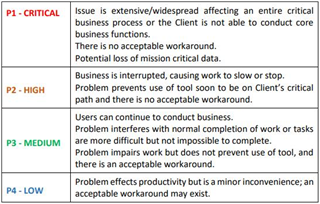
  • I understand where you're coming from.  But the teams need to have a mechanism for categorising and prioritising work, so this is what they use in support:

    Priority classification chart with four levels. P1 - CRITICAL: Extensive issue affecting business with no workaround. P2 - HIGH: Business interrupted, no acceptable workaround. P3 - MEDIUM: Problem interferes but work can continue. P4 - LOW: Minor inconvenience, workaround may exist.

    I'm not sure yet how they will see this one, but I think it should be a "P2 - High" because it's debatable whether or not the workaround you have provided is acceptable or not.  Given the importance we place around checking for additional spaces in the QA tools I think being forced to add one where there should not be one is unacceptable.  But from a technical perspective I can't be sure what the view will be until the issue is investigated.

    Anyway, I hope that gives you some insight into the process the teams will go through as they have more than a few bugs to prioritise, and we'll update this post, and the other one once we have the bug number to track.

    https://community.sdl.com/product-groups/translationproductivity/f/studio/34461/sdl-trados-studio-2021-does-not-recognize-arabic-characters-after-update

    Paul Filkin | RWS

    Design your own training!
    You've done the courses and still need to go a little further, or still not clear? 
    Tell us what you need in our Community Solutions Hub

    emoji


    Generated Image Alt-Text
    [edited by: Trados AI at 1:34 AM (GMT 0) on 29 Feb 2024]
  • Thank you for the detailed response.
    For now, we keep adding additional spaces until it gets fixed.

  • Please check your inbox.

    Thank you for sending me the files.

    Paul Filkin | RWS

    Design your own training!
    You've done the courses and still need to go a little further, or still not clear? 
    Tell us what you need in our Community Solutions Hub