 Translate



Since applying the recent update to Trados 2019, every time i try and generate a target excel file i get this error. Do you know if there is any bug related to the update that may be causing this?

RWS Community
Since applying the recent update to Trados 2019, every time i try and generate a target excel file i get this error. Do you know if there is any bug related to the update that may be causing this?
Thanks, as mentioned this is happening for all excel files but here is one error stack.
<SDLErrorDetails time="08/03/2021 13:33:46">
  <ErrorMessage>Failed to save target content: Object reference not set to an instance of an object.</ErrorMessage>
  <Exception>
    <Type>System.NullReferenceException, mscorlib, Version=4.0.0.0, Culture=neutral, PublicKeyToken=b77a5c561934e089</Type>
    <HelpLink />
    <Source>Sdl.FileTypeSupport.Filters.Excel</Source>
    <HResult>-2147467261</HResult>
    <StackTrace><![CDATA[   at Sdl.FileTypeSupport.Filters.Excel.FilterControllerFramework.OfficeController.UpdateDocumentFile(XsltArgumentList argsList, XslCompiledTransform xslTransform, XPathNavigator child)
   at Sdl.FileTypeSupport.Filters.Excel.FilterControllerFramework.OfficeController.IterateXsltFiles(XsltArgumentList argsList, FileMap rule, XPathNodeIterator iter, Boolean isUpdate, String targetFilePath)
   at Sdl.FileTypeSupport.Filters.Excel.FilterControllerFramework.OfficeController.IterateContentType(String xslFileNamesPath, Boolean isUpdate, String filePath, String filterStr, String targetFilePath, Boolean isCalledByRelsTableIteration)
   at Sdl.FileTypeSupport.Filters.Excel.FilterControllerFramework.OfficeController.serviceBackward()
   at Sdl.FileTypeSupport.Filters.Excel.PlugInFilter.FileParser.DocumentParser.Update()
   at Sdl.FileTypeSupport.Filters.Excel.PlugInFilter.FileParser.DocumentExtractImpl.Update(DocumentCollection srcCollection, String filename, String tgtFilePath)
   at Sdl.FileTypeSupport.Filters.Excel.PlugInFilter.FileWriterAndPreviewFileWriter.WriterImpl.EndOfInput()
   at Sdl.FileTypeSupport.Filters.Excel.PlugInFilter.FileWriterAndPreviewFileWriter.ExcelWriter.EndOfInput()
   at Sdl.FileTypeSupport.Framework.Integration.NativeWriterMessagesProxy.EndOfInput()
   at Sdl.FileTypeSupport.Framework.Integration.FileGenerator.CallEndOfInput()
   at Sdl.FileTypeSupport.Framework.Integration.FileGenerator.FileComplete()
   at Sdl.FileTypeSupport.Framework.Integration.AbstractBilingualProcessorContainer.FileComplete()
   at Sdl.FileTypeSupport.Framework.Integration.MultiFileConverter.FileComplete()
   at Sdl.FileTypeSupport.Framework.BilingualApi.AbstractBilingualContentProcessor.FileComplete()
   at Sdl.FileTypeSupport.Framework.Integration.AbstractBilingualProcessorContainer.FileComplete()
   at Sdl.FileTypeSupport.Bilingual.Tmfc.TmfcReaderImpl.vv_Visit(TmfcReaderImpl* , FrameworkFileContainerField* field)
   at FrameworkFileContainerField.vv_AcceptFrameworkVisitor(FrameworkFileContainerField* , FrameworkFieldVisitor* visitor)
   at Sdl.FileTypeSupport.Bilingual.Tmfc.TmfcReaderImpl.vv_VisitStartEndField(TmfcReaderImpl* , StartEndField* startEnd)
   at Sdl.FileTypeSupport.Bilingual.Tmfc.TmfcReaderImpl.b_VisitNext(TmfcReaderImpl* )
   at Sdl.FileTypeSupport.Bilingual.Tmfc.TmfcReader.ParseNext()
   at Sdl.FileTypeSupport.Framework.Integration.FileExtractor.ParseNext()
   at Sdl.FileTypeSupport.Framework.Integration.MultiFileConverter.ParseNext()
   at Sdl.FileTypeSupport.Framework.Integration.MultiFileConverter.Parse()
   at Sdl.TranslationStudio.Editor.TranslationEditor.SaveMonolingualAsJobRequest.Execute(IJobExecutionContext context)
   at Sdl.Desktop.Platform.Implementation.Services.Job.<_worker_DoWork>b__47_0()
   at Sdl.Desktop.Logger.Log.Resources(Object message, Action action)
   at Sdl.Desktop.Platform.Implementation.Services.Job._worker_DoWork(Object sender, DoWorkEventArgs e)
   at System.ComponentModel.BackgroundWorker.OnDoWork(DoWorkEventArgs e)
   at System.ComponentModel.BackgroundWorker.WorkerThreadStart(Object argument)]]></StackTrace>
  </Exception>
  <Environment>
    <ProductName>SDL Trados Studio</ProductName>
    <ProductVersion>15.0.0.0</ProductVersion>
    <EntryAssemblyFileVersion>15.2.8.3007</EntryAssemblyFileVersion>
    <OperatingSystem>Microsoft Windows 10 Pro</OperatingSystem>
    <ServicePack>NULL</ServicePack>
    <OperatingSystemLanguage>2057</OperatingSystemLanguage>
    <CodePage>1252</CodePage>
    <LoggedOnUser>ONEGLOBAL\hannah.chew</LoggedOnUser>
    <DotNetFrameWork>4.0.30319.42000</DotNetFrameWork>
    <ComputerName>OG-LPT-021</ComputerName>
    <ConnectedToNetwork>True</ConnectedToNetwork>
    <PhysicalMemory>8256208 MB</PhysicalMemory>
  </Environment>
</SDLErrorDetails>

Hello Hannah Chew ,
Thanks for this.
You should be able to rectify this quite simply by changing the order of the filters.
This article refers to 2017- but the principle should be the same.
https://gateway.rws.com/csm?id=kb_article_view&sysparm_article=KB0031066
Oana Nagy | QA Engineer | RWS Group

Thanks for the quick response, I have checked this and can't see that there is anything that needs changing?
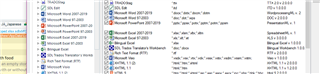

Thanks for the quick response, I have checked this and can't see that there is anything that needs changing?
Hello Hannah Chew,
There is a strange empty line between the file types which I wouldn't expect to see-
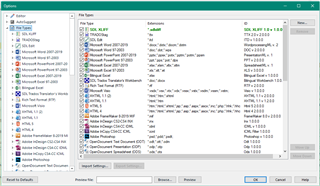
Would you be able to perhaps share the file with me please (swhale@sdl.com) and i will take a quick look.
Oana Nagy | QA Engineer | RWS Group
