


Analyze Files giving error messages

I'm working on a rather large project at the moment with 5 milestone deliveries, so I've been analysing different groups of files, as well as the project as a whole, at various stages of the project.

This morning 'Anaylze Files' starting going wonky and giving me loads of errors on a good deal of the files.

I noticed that a whole bunch of the files in the Files view have all-of-a-sudden been given a word count of 0 (both those with a 'Translated' and 'In Translation' status).

I've tried to pre-translate the file just using my TM to see if I can get the proper word counts back.

I've also tried the good old hop in and out of another project trick, but nothing's working.

Any clues would be appreciated, thanks!
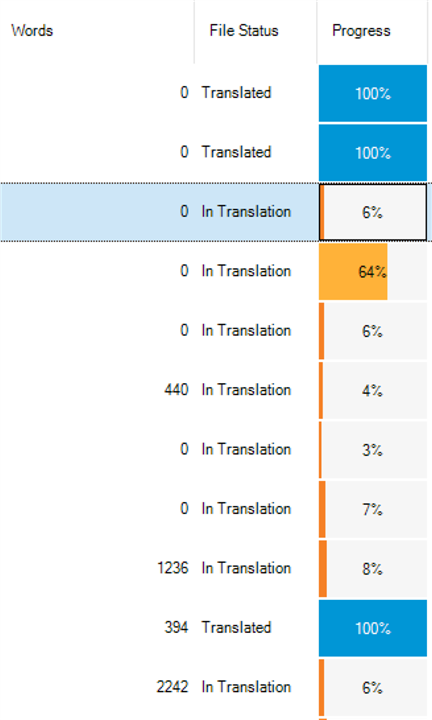
Screenshot of Trados Studio's Files view showing multiple files with a word count of 0, despite varying translation progress percentages.


Generated Image Alt-Text
[edited by: Trados AI at 1:31 AM (GMT 0) on 29 Feb 2024]
emoji
Parents Reply Children
  • Thanks !

    That brought back back the word counts again, but then when I ran the 'Analyze Files' batch task again it gave errors like the one I've attached for a good deal of the files.

    When trying trying to run 'Analyze Files' again it wiped the word counts of probably the same files as it did before, so something's not right.

    <SDLErrorDetails time="2021/03/12 03:24:48">
      <ErrorMessage>Object reference not set to an instance of an object.</ErrorMessage>
      <Exception>
        <Type>System.NullReferenceException, mscorlib, Version=4.0.0.0, Culture=neutral, PublicKeyToken=b77a5c561934e089</Type>
        <HelpLink />
        <Source>Sdl.ProjectApi.AutomaticTasks</Source>
        <HResult>-2147467261</HResult>
        <StackTrace><![CDATA[   at Sdl.ProjectApi.AutomaticTasks.Analysis.AnalysisContentProcessorX.ProcessParagraphUnit(IParagraphUnit paragraphUnit)
       at Sdl.FileTypeSupport.Framework.Core.Utilities.BilingualApi.BilingualContentHandlerAdapter.ProcessParagraphUnit(IParagraphUnit paragraphUnit)
       at Sdl.ProjectApi.AutomaticTasks.TranslationMemoryLookupContentProcessor.OutputParagraphs()
       at Sdl.ProjectApi.AutomaticTasks.TranslationMemoryLookupContentProcessor.ProcessWaitingParagraphs()
       at Sdl.ProjectApi.AutomaticTasks.TranslationMemoryLookupContentProcessor.ProcessParagraphUnit(IParagraphUnit paragraphUnit)
       at Sdl.FileTypeSupport.Framework.BilingualApi.AbstractBilingualContentProcessor.ProcessParagraphUnit(IParagraphUnit paragraphUnit)
       at Sdl.FileTypeSupport.Filters.Processors.SegmentRenumberingBilingualProcessor.ProcessParagraphUnit(IParagraphUnit paragraphUnit)
       at Sdl.FileTypeSupport.Framework.Core.Utilities.BilingualApi.BilingualContentHandlerAdapter.ProcessParagraphUnit(IParagraphUnit paragraphUnit)
       at Sdl.FileTypeSupport.Framework.Core.Utilities.BilingualApi.BilingualContentHandlerAdapter.ProcessParagraphUnit(IParagraphUnit paragraphUnit)
       at Sdl.FileTypeSupport.Framework.Integration.AbstractBilingualProcessorContainer.ProcessParagraphUnit(IParagraphUnit paragraphUnit)
       at Sdl.FileTypeSupport.Framework.BilingualApi.AbstractBilingualContentProcessor.ProcessParagraphUnit(IParagraphUnit paragraphUnit)
       at Sdl.FileTypeSupport.Framework.Integration.LocationMarkerLocator.ProcessParagraphUnit(IParagraphUnit paragraphUnit)
       at Sdl.FileTypeSupport.Framework.Integration.AbstractBilingualProcessorContainer.ProcessParagraphUnit(IParagraphUnit paragraphUnit)
       at Sdl.FileTypeSupport.Framework.Integration.FileExtractor.ProcessParagraphUnit(IParagraphUnit paragraphUnit)
       at Sdl.FileTypeSupport.Framework.Core.Utilities.BilingualApi.ParagraphUnitBuffer.ProcessParagraphUnit(IParagraphUnit pu)
       at Sdl.FileTypeSupport.Bilingual.SdlXliff.XliffFileReader.OutputParagraphUnit(IParagraphUnit pu)
       at Sdl.FileTypeSupport.Bilingual.SdlXliff.XliffFileReader.ParseLocalizableParagraphUnit(transunit transunit, LockTypeFlags lockFlags)
       at Sdl.FileTypeSupport.Bilingual.SdlXliff.XliffFileReader.ParseTransUnit(transunit transunit)
       at Sdl.FileTypeSupport.Bilingual.SdlXliff.XliffFileReader.ParseGroup(group group)
       at Sdl.FileTypeSupport.Bilingual.SdlXliff.XliffFileReader.OnGroup(XmlElement group)
       at Sdl.FileTypeSupport.Bilingual.SdlXliff.SdlXliffFeeder.<ContinueScanning>b__14_11(ISdlXliffStreamContentHandler handler)
       at System.Collections.Generic.List`1.ForEach(Action`1 action)
       at Sdl.FileTypeSupport.Bilingual.SdlXliff.SdlXliffFeeder.ContinueScanning()
       at Sdl.FileTypeSupport.Bilingual.SdlXliff.XliffFileReader.ContinueParsing()
       at Sdl.FileTypeSupport.Bilingual.SdlXliff.XliffFileReader.ParseNext()
       at Sdl.FileTypeSupport.Framework.Integration.FileExtractor.ParseNext()
       at Sdl.FileTypeSupport.Framework.Integration.MultiFileConverter.ParseNext()
       at Sdl.FileTypeSupport.Framework.Integration.MultiFileConverter.Parse()
       at Sdl.ProjectApi.Implementation.TaskExecution.ContentProcessingTaskImplementation.TaskFileExecuter.Parse(String targetFilePath)]]></StackTrace>
      </Exception>
      <Environment>
        <ProductName>SDL Trados Studio</ProductName>
        <ProductVersion>Studio16</ProductVersion>
        <EntryAssemblyFileVersion>16.1.4.4184</EntryAssemblyFileVersion>
        <OperatingSystem>Microsoft Windows 10 Home</OperatingSystem>
        <ServicePack>NULL</ServicePack>
        <OperatingSystemLanguage>1044</OperatingSystemLanguage>
        <CodePage>1252</CodePage>
        <LoggedOnUser>THE-NATTOP\Nathanael</LoggedOnUser>
        <DotNetFrameWork>4.0.30319.42000</DotNetFrameWork>
        <ComputerName>THE-NATTOP</ComputerName>
        <ConnectedToNetwork>True</ConnectedToNetwork>
        <PhysicalMemory>16732904 MB</PhysicalMemory>
      </Environment>
    </SDLErrorDetails>

  • I think you should try a reset first as this may be one of those things that we cannot clearly say "do this and it'll fix it", but may be a combination of something a reset cures.  Not a great solution I'm afraid, but try this first and if it doesn't resolve it we can log this with support for a more details look at the problem on your machine.

    You could use this app for the reset and this will also explain what you will lose by carrying out a reset before you do it:

    appstore.sdl.com/.../

    But if you'd rather do this manually then rename this folder (just add _old to the end or something, it's not important what you rename it to) and restart Studio:

    c:\Users\[USERNAME]\AppData\Roaming\SDL\SDL Trados Studio\Studio16

    So the path would become this:

    c:\Users\[USERNAME]\AppData\Roaming\SDL\SDL Trados Studio\Studio16_old

    If you can't find this folder then you need to unhide your hidden files/folders:

    www.howtogeek.com/.../

    Paul Filkin | RWS Group

    ________________________
    Design your own training!

    You've done the courses and still need to go a little further, or still not clear? 
    Tell us what you need in our Community Solutions Hub