 Translate



Trados2017を使用しています。
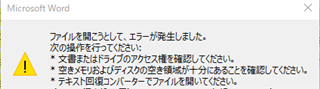
訳文生成したファイルを開こうとすると下記メッセージが表示されてしまい、訳文生成をすることができません。
もし解決方法がありましたら伺えますでしょうか。
お手数ですが、どうぞ宜しくお願い致します。
Generated Image Alt-Text
[edited by: Trados AI at 1:35 AM (GMT 0) on 29 Feb 2024]


Trados2017を使用しています。
訳文生成したファイルを開こうとすると下記メッセージが表示されてしまい、訳文生成をすることができません。
もし解決方法がありましたら伺えますでしょうか。
お手数ですが、どうぞ宜しくお願い致します。
Hello N Inoue,
As we are unable to read the error message, perhaps our colleague will be able to assist you further.
Oana Nagy | QA Engineer | RWS Group
Hello N Inoue,
As we are unable to read the error message, perhaps our colleague will be able to assist you further.
Oana Nagy | QA Engineer | RWS Group
