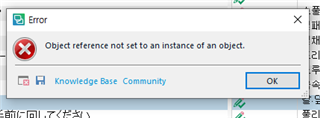
Error message: "Object reference not set to an instance of an object

Please help me!!

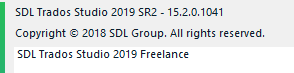
Software: SDL Trados Studio 2017 Freelance

Computer: Windows10, 64bit, Intel i5

Issue;

- This happens often.

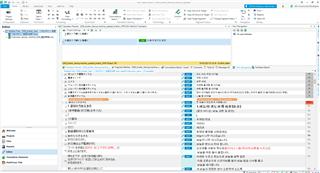
- When I select all files by Ctrl+A and then open it, it shows the error message of "Object reference not set to an instance of an object" after clicking Ctrl+S (saving). So I cannot save the files.

- If I open one file, there is no such error. So now I open it one by one, but it is very ineffective.

- I attached the error log files. One is when I opened excel and word files, the other is for rtf and xml files.

- I have contacted SDL Korea technical support team. They ask me to run Repair Studio of SDL FRESHSTART, but it did not clear the issue. And they said SDL is not supporting for this issue any more for 2017 version. But recent version have cleared this issue, so they talked to me to buy recent version.

- It seems it is known issue. Please help me to clear this issue, not to ask me to buy new version.

I am looking forward to having a solution for this issue as soon as possible.

<SDLErrorDetails time="2021-03-14 오후 12:02:48">
  <ErrorMessage>개체 참조가 개체의 인스턴스로 설정되지 않았습니다.</ErrorMessage>
  <Exception>
    <Type>System.NullReferenceException, mscorlib, Version=4.0.0.0, Culture=neutral, PublicKeyToken=b77a5c561934e089</Type>
    <HelpLink />
    <Source>Sdl.TranslationStudio.Api</Source>
    <HResult>-2147467261</HResult>
    <StackTrace><![CDATA[   위치: Sdl.TranslationStudio.Api.Common.SdlxliffXmlDocumentHelper.RemoveUnwantedCommentDefinitions(XDocument childDocument, XmlNamespaceManager nsManager)
   위치: Sdl.TranslationStudio.Api.Common.SdlxliffXmlDocumentHelper.TransferDocumentInfo(XDocument mergedDocument, XDocument childDocument, XmlNamespaceManager nsManager)
   위치: Sdl.TranslationStudio.Api.Common.MergedFileChildrenPersister.CreateChildFilesDocuments(XmlNamespaceManager nsManager)
   위치: Sdl.TranslationStudio.Api.Common.MergedFileChildrenPersister.SaveChildFiles(String outputFile, String[] bilingualFilePaths)
   위치: Sdl.TranslationStudio.Editor.TranslationEditor.TranslatableDocument.SaveBilingualImpl(String[] bilingualFilePaths, Boolean copy, IJobExecutionContext context, Boolean isAutoSaved)
   위치: Sdl.TranslationStudio.Editor.TranslationEditor.TranslatableDocument.Save(IJobExecutionContext context)
   위치: Sdl.TranslationStudio.Api.Editor.AbstractInternalDocument.SaveJobRequest.Execute(IJobExecutionContext context)
   위치: Sdl.Desktop.Platform.Implementation.Services.Job.<_worker_DoWork>b__46_0()
   위치: Sdl.Desktop.Platform.Implementation.Services.Log.Resources(Object message, Action action)
   위치: Sdl.Desktop.Platform.Implementation.Services.Job._worker_DoWork(Object sender, DoWorkEventArgs e)
   위치: System.ComponentModel.BackgroundWorker.OnDoWork(DoWorkEventArgs e)
   위치: System.ComponentModel.BackgroundWorker.WorkerThreadStart(Object argument)]]></StackTrace>
  </Exception>
  <Environment>
    <ProductName>SDL Trados Studio</ProductName>
    <ProductVersion>14.0.0.0</ProductVersion>
    <EntryAssemblyFileVersion>14.1.10018.54792</EntryAssemblyFileVersion>
    <OperatingSystem>Microsoft Windows 10 Pro</OperatingSystem>
    <ServicePack>NULL</ServicePack>
    <OperatingSystemLanguage>1042</OperatingSystemLanguage>
    <CodePage>949</CodePage>
    <LoggedOnUser>DESKTOP-777DQA3\choky</LoggedOnUser>
    <DotNetFrameWork>4.0.30319.42000</DotNetFrameWork>
    <ComputerName>DESKTOP-777DQA3</ComputerName>
    <ConnectedToNetwork>True</ConnectedToNetwork>
    <PhysicalMemory>8273932 MB</PhysicalMemory>
  </Environment>
</SDLErrorDetails>
<SDLErrorDetails time="2021-03-12 오후 8:20:58">
  <ErrorMessage>개체 참조가 개체의 인스턴스로 설정되지 않았습니다.</ErrorMessage>
  <Exception>
    <Type>System.NullReferenceException, mscorlib, Version=4.0.0.0, Culture=neutral, PublicKeyToken=b77a5c561934e089</Type>
    <HelpLink />
    <Source>Sdl.TranslationStudio.Api</Source>
    <HResult>-2147467261</HResult>
    <StackTrace><![CDATA[   위치: Sdl.TranslationStudio.Api.Common.SdlxliffXmlDocumentHelper.RemoveUnwantedCommentDefinitions(XDocument childDocument, XmlNamespaceManager nsManager)
   위치: Sdl.TranslationStudio.Api.Common.SdlxliffXmlDocumentHelper.TransferDocumentInfo(XDocument mergedDocument, XDocument childDocument, XmlNamespaceManager nsManager)
   위치: Sdl.TranslationStudio.Api.Common.MergedFileChildrenPersister.CreateChildFilesDocuments(XmlNamespaceManager nsManager)
   위치: Sdl.TranslationStudio.Api.Common.MergedFileChildrenPersister.SaveChildFiles(String outputFile, String[] bilingualFilePaths)
   위치: Sdl.TranslationStudio.Editor.TranslationEditor.TranslatableDocument.SaveBilingualImpl(String[] bilingualFilePaths, Boolean copy, IJobExecutionContext context, Boolean isAutoSaved)
   위치: Sdl.TranslationStudio.Editor.TranslationEditor.TranslatableDocument.Save(IJobExecutionContext context)
   위치: Sdl.TranslationStudio.Api.Editor.AbstractInternalDocument.SaveJobRequest.Execute(IJobExecutionContext context)
   위치: Sdl.Desktop.Platform.Implementation.Services.Job.<_worker_DoWork>b__46_0()
   위치: Sdl.Desktop.Platform.Implementation.Services.Log.Resources(Object message, Action action)
   위치: Sdl.Desktop.Platform.Implementation.Services.Job._worker_DoWork(Object sender, DoWorkEventArgs e)
   위치: System.ComponentModel.BackgroundWorker.OnDoWork(DoWorkEventArgs e)
   위치: System.ComponentModel.BackgroundWorker.WorkerThreadStart(Object argument)]]></StackTrace>
  </Exception>
  <Environment>
    <ProductName>SDL Trados Studio</ProductName>
    <ProductVersion>14.0.0.0</ProductVersion>
    <EntryAssemblyFileVersion>14.1.10018.54792</EntryAssemblyFileVersion>
    <OperatingSystem>Microsoft Windows 10 Pro</OperatingSystem>
    <ServicePack>NULL</ServicePack>
    <OperatingSystemLanguage>1042</OperatingSystemLanguage>
    <CodePage>949</CodePage>
    <LoggedOnUser>DESKTOP-777DQA3\choky</LoggedOnUser>
    <DotNetFrameWork>4.0.30319.42000</DotNetFrameWork>
    <ComputerName>DESKTOP-777DQA3</ComputerName>
    <ConnectedToNetwork>True</ConnectedToNetwork>
    <PhysicalMemory>8273932 MB</PhysicalMemory>
  </Environment>
</SDLErrorDetails>

Parents
  • You may not wish to upgrade to 2021, but you can at least upgrade to the latest version of 2017.  Nobody will help you until your have done this at least.  You are running 14.0.0.0.  The current version is:

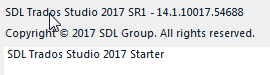
    SDL Trados Studio 2017 SR1 - 14.1.10018.5479

    Paul Filkin | RWS

    Design your own training!
    You've done the courses and still need to go a little further, or still not clear? 
    Tell us what you need in our Community Solutions Hub

  • Thanks for your advice. Updated it and now I have SDL Trados Studio 2017 SR1 - 14.1.10018.54792. But it does not change anything.

    The attachment is the error log after updated.

    <SDLErrorDetails time="2021-03-15 오후 5:28:13">
      <ErrorMessage>개체 참조가 개체의 인스턴스로 설정되지 않았습니다.</ErrorMessage>
      <Exception>
        <Type>System.NullReferenceException, mscorlib, Version=4.0.0.0, Culture=neutral, PublicKeyToken=b77a5c561934e089</Type>
        <HelpLink />
        <Source>Sdl.TranslationStudio.Api</Source>
        <HResult>-2147467261</HResult>
        <StackTrace><![CDATA[   위치: Sdl.TranslationStudio.Api.Common.SdlxliffXmlDocumentHelper.RemoveUnwantedCommentDefinitions(XDocument childDocument, XmlNamespaceManager nsManager)
       위치: Sdl.TranslationStudio.Api.Common.SdlxliffXmlDocumentHelper.TransferDocumentInfo(XDocument mergedDocument, XDocument childDocument, XmlNamespaceManager nsManager)
       위치: Sdl.TranslationStudio.Api.Common.MergedFileChildrenPersister.CreateChildFilesDocuments(XmlNamespaceManager nsManager)
       위치: Sdl.TranslationStudio.Api.Common.MergedFileChildrenPersister.SaveChildFiles(String outputFile, String[] bilingualFilePaths)
       위치: Sdl.TranslationStudio.Editor.TranslationEditor.TranslatableDocument.SaveBilingualImpl(String[] bilingualFilePaths, Boolean copy, IJobExecutionContext context, Boolean isAutoSaved)
       위치: Sdl.TranslationStudio.Editor.TranslationEditor.TranslatableDocument.Save(IJobExecutionContext context)
       위치: Sdl.TranslationStudio.Api.Editor.AbstractInternalDocument.SaveJobRequest.Execute(IJobExecutionContext context)
       위치: Sdl.Desktop.Platform.Implementation.Services.Job.<_worker_DoWork>b__46_0()
       위치: Sdl.Desktop.Platform.Implementation.Services.Log.Resources(Object message, Action action)
       위치: Sdl.Desktop.Platform.Implementation.Services.Job._worker_DoWork(Object sender, DoWorkEventArgs e)
       위치: System.ComponentModel.BackgroundWorker.OnDoWork(DoWorkEventArgs e)
       위치: System.ComponentModel.BackgroundWorker.WorkerThreadStart(Object argument)]]></StackTrace>
      </Exception>
      <Environment>
        <ProductName>SDL Trados Studio</ProductName>
        <ProductVersion>14.0.0.0</ProductVersion>
        <EntryAssemblyFileVersion>14.1.10018.54792</EntryAssemblyFileVersion>
        <OperatingSystem>Microsoft Windows 10 Pro</OperatingSystem>
        <ServicePack>NULL</ServicePack>
        <OperatingSystemLanguage>1042</OperatingSystemLanguage>
        <CodePage>949</CodePage>
        <LoggedOnUser>DESKTOP-777DQA3\choky</LoggedOnUser>
        <DotNetFrameWork>4.0.30319.42000</DotNetFrameWork>
        <ComputerName>DESKTOP-777DQA3</ComputerName>
        <ConnectedToNetwork>True</ConnectedToNetwork>
        <PhysicalMemory>8273932 MB</PhysicalMemory>
      </Environment>
    </SDLErrorDetails>
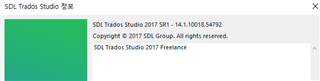
    Screenshot of SDL Trados Studio 2017 SR1 version 14.1.10018.54792 showing the software's start-up screen with copyright information.


    Generated Image Alt-Text
    [edited by: Trados AI at 2:03 AM (GMT 0) on 29 Feb 2024]
Reply
  • Thanks for your advice. Updated it and now I have SDL Trados Studio 2017 SR1 - 14.1.10018.54792. But it does not change anything.

    The attachment is the error log after updated.

    <SDLErrorDetails time="2021-03-15 오후 5:28:13">
      <ErrorMessage>개체 참조가 개체의 인스턴스로 설정되지 않았습니다.</ErrorMessage>
      <Exception>
        <Type>System.NullReferenceException, mscorlib, Version=4.0.0.0, Culture=neutral, PublicKeyToken=b77a5c561934e089</Type>
        <HelpLink />
        <Source>Sdl.TranslationStudio.Api</Source>
        <HResult>-2147467261</HResult>
        <StackTrace><![CDATA[   위치: Sdl.TranslationStudio.Api.Common.SdlxliffXmlDocumentHelper.RemoveUnwantedCommentDefinitions(XDocument childDocument, XmlNamespaceManager nsManager)
       위치: Sdl.TranslationStudio.Api.Common.SdlxliffXmlDocumentHelper.TransferDocumentInfo(XDocument mergedDocument, XDocument childDocument, XmlNamespaceManager nsManager)
       위치: Sdl.TranslationStudio.Api.Common.MergedFileChildrenPersister.CreateChildFilesDocuments(XmlNamespaceManager nsManager)
       위치: Sdl.TranslationStudio.Api.Common.MergedFileChildrenPersister.SaveChildFiles(String outputFile, String[] bilingualFilePaths)
       위치: Sdl.TranslationStudio.Editor.TranslationEditor.TranslatableDocument.SaveBilingualImpl(String[] bilingualFilePaths, Boolean copy, IJobExecutionContext context, Boolean isAutoSaved)
       위치: Sdl.TranslationStudio.Editor.TranslationEditor.TranslatableDocument.Save(IJobExecutionContext context)
       위치: Sdl.TranslationStudio.Api.Editor.AbstractInternalDocument.SaveJobRequest.Execute(IJobExecutionContext context)
       위치: Sdl.Desktop.Platform.Implementation.Services.Job.<_worker_DoWork>b__46_0()
       위치: Sdl.Desktop.Platform.Implementation.Services.Log.Resources(Object message, Action action)
       위치: Sdl.Desktop.Platform.Implementation.Services.Job._worker_DoWork(Object sender, DoWorkEventArgs e)
       위치: System.ComponentModel.BackgroundWorker.OnDoWork(DoWorkEventArgs e)
       위치: System.ComponentModel.BackgroundWorker.WorkerThreadStart(Object argument)]]></StackTrace>
      </Exception>
      <Environment>
        <ProductName>SDL Trados Studio</ProductName>
        <ProductVersion>14.0.0.0</ProductVersion>
        <EntryAssemblyFileVersion>14.1.10018.54792</EntryAssemblyFileVersion>
        <OperatingSystem>Microsoft Windows 10 Pro</OperatingSystem>
        <ServicePack>NULL</ServicePack>
        <OperatingSystemLanguage>1042</OperatingSystemLanguage>
        <CodePage>949</CodePage>
        <LoggedOnUser>DESKTOP-777DQA3\choky</LoggedOnUser>
        <DotNetFrameWork>4.0.30319.42000</DotNetFrameWork>
        <ComputerName>DESKTOP-777DQA3</ComputerName>
        <ConnectedToNetwork>True</ConnectedToNetwork>
        <PhysicalMemory>8273932 MB</PhysicalMemory>
      </Environment>
    </SDLErrorDetails>

    Screenshot of SDL Trados Studio 2017 SR1 version 14.1.10018.54792 showing the software's start-up screen with copyright information.


    Generated Image Alt-Text
    [edited by: Trados AI at 2:03 AM (GMT 0) on 29 Feb 2024]
Children