
 Translate



Dear everybody,
I got a quite strange problem with my SDL Trados Studio 2019.
It’s only happening with rather big projects (packages that I get from one of my translation agencies): I translate most of the text, but when I get to about the second third of the file there is either one or two or three files that I cannot translate: Because everytime I click into the translation segment the whole Trados will stop and crash in the second I click into the segment.. The source segment works however, it’s only the translation segment.
Thus: It’s always quite in the end. Of a bigger project. Of a SDL package. It already happen with packages from different agencies. And it’s always the same segments that won’t work and thus are not edible at all.
The agency who’s package I was translating when this first happened tried it out on THEIR server, but THEY didn’t experience any problem with the file or with those segments..
Only one time in what feels like a hundred tries I got an error message telling me something about the RAM of my laptop might be not right.. That’s why I suppose it might be the case that my laptop simply has too little RAM? I don’t have problems with any other programs, but I don’t use any program that RAM-intensive as Trados Studio, thus I can’t know. It also already happened that Trados crashed in a completely “normal” segment, apparently just because I handled it a bit too quickly and my laptop couldn’t bring up enough “energy” for that action. That’s what also makes me think it might be a problem about my RAM. My laptop has 8 GB RAM and I heard that SDL Trados works best with 16 GB RAM, so now, as it’s only happening with big projects I think that might be the solution.
However, I wanted to ask you, what else it might be and what you think I could try or if it’s indeed worth a try getting myself more RAM for my laptop.
Yes, I installed every single new update for Windows, MS Office, every driver on my laptop and SDL Trados Studio and Multiterm itself, I also have no trash software or data or virus or anything else on my laptop, I tried that all and the problem still persists.
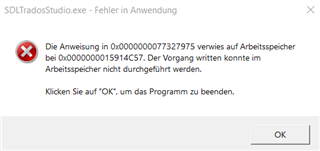
This is the only error message I only got once: "Die Anweisung 0x0000000077327975 verwies auf Arbeitsspeicher bei 0x0000000015914C57. Der Vorgang written konnte im Arbeitsspeicher nicht durchgeführt werden." ("0x00000077327975 referred to the RAM 0x00000015914C57. The operation "written" (also in German like that, I have no idea what that means??) could not be performed by the RAM")
Thank you very much for any possibly useful answers!
Greetings from Germany,
Verena
Generated Image Alt-Text
[edited by: Trados AI at 1:43 AM (GMT 0) on 29 Feb 2024]


