Auto-propagation question

Hello all,

I have five modules (.xlf source files) that I have imported into a SDL Trados Studio project. Each of these modules contains a number of duplicated strings, but only one of the strings has been edited/updated. 

How do I auto-propagate the newly edited strings to over-write the old translations. How do I ensure that the newly edited strings are treated as the new source of truth strings?

The commonality would be the English source language, which has not changed, so it could be used to match the other strings.

Thank you. :) 

Parents Reply
  • Thank you so much 

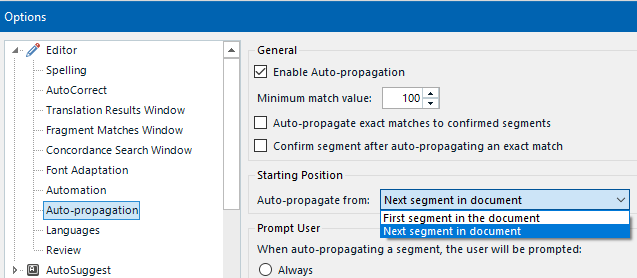
    I actually set "First segment in the document" but you're suggesting "Next segment in document"  what is the difference? I think this means that it will retrospectively change segments you may already have checked. Whereas, "Next segment..." propagates forwards any edits made to segments. 

    But I am taking on .xlf modules that were previously edited, so the "correct" segments are scattered throughout each of the five modules. Is there a strategy that I can use to pre-lock the changed segments and use those segments as the source of truth throughout the other modules, before auto-propagating?

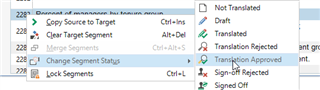
    I thought something like "Translation Approved" would do that.

    Trados Studio dropdown menu showing options for segment status including Translation Approved and Lock Segments.

    Thank you again.

    emoji


    Generated Image Alt-Text
    [edited by: Trados AI at 1:39 AM (GMT 0) on 29 Feb 2024]
Children