 Translate



I can find already registered terms on 'Lookups Panel' but have no idea to apply terms to the sentences.
Is there any HotKey as well?

I can find already registered terms on 'Lookups Panel' but have no idea to apply terms to the sentences.
Is there any HotKey as well?
Hi Miyoung Jeon
The most popular method adopted by our users is to insert term relying on AutoSuggest.
To ensure this works smoothly for you please check your default settings:
1.File
2.Options
3.AutoSuggest
Ensure its Enabled and that Termbase is an accepted source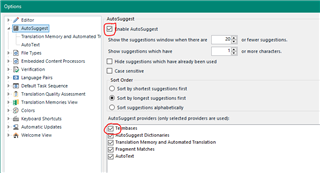
As a result as you type the first character or 2 from your recognised term, it can be inserted quickly using "predictive text" powered by AutoSuggest.
Alternatively, select ctrl+shift+L to get term matches straight in the Editor.
Documentation can be found here: docs.sdl.com/.../inserting-a-term-translation
I hope this helps
Lydia
Oana Nagy | QA Engineer | RWS Group

Hi Miyoung Jeon
The most popular method adopted by our users is to insert term relying on AutoSuggest.
To ensure this works smoothly for you please check your default settings:
1.File
2.Options
3.AutoSuggest
Ensure its Enabled and that Termbase is an accepted source
As a result as you type the first character or 2 from your recognised term, it can be inserted quickly using "predictive text" powered by AutoSuggest.
Alternatively, select ctrl+shift+L to get term matches straight in the Editor.
Documentation can be found here: docs.sdl.com/.../inserting-a-term-translation
I hope this helps
Lydia
Oana Nagy | QA Engineer | RWS Group

Dear Lydia,
Thank you for your help.
Following your description, I could apply terms to segment on Studio successfully!
Can I do the same thing on Group Share?
