


How to automatically reflect the output from two machine translation engines (DeepL MT and Google MT)

We are using two different machine translation engines (DeepL MT and Google MT: see the blue circle in the attached image).

The problem is that it is only Google MT output that automatically insert in the target text cells (see the yellow circle in the attached image). How can I automatically reflect both DeepL MT and Google MT output.

I appreciate if anyone would give me an solution.
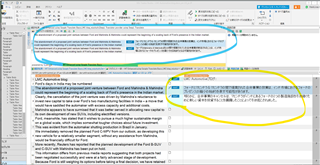
Screenshot of Trados Studio interface showing two machine translation engines, DeepL MT and Google MT, highlighted with a blue circle. The Google MT output is automatically inserted into the target text cells, highlighted with a yellow circle.
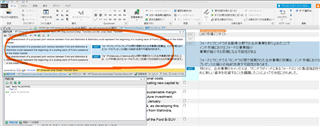
Screenshot of Trados Studio settings with an orange circle highlighting the machine translation settings area, indicating where to adjust settings for automatic insertion of translation outputs.


Generated Image Alt-Text
[edited by: Trados AI at 1:45 AM (GMT 0) on 29 Feb 2024]

emoji
Parents Reply Children