 Translate



Hello,
Where can I find and edit the AutoCorrect file for Studio 2021?
Sandor

Hello,
Where can I find and edit the AutoCorrect file for Studio 2021?
Sandor
I just export my autocorrect file, amend it and then import it back. No matter where you save the export file.
By the way, this allows you to add entries that you can't add through Studio interface.
For example, there is no way to add an autocorrection pair for thin space (correct me anybody if I'm wrong). You can type it by Alt+8201 somewhere in text editor and then paste it but the 'Add' button won't be activated. The export/import workaround allows you to achieve this task.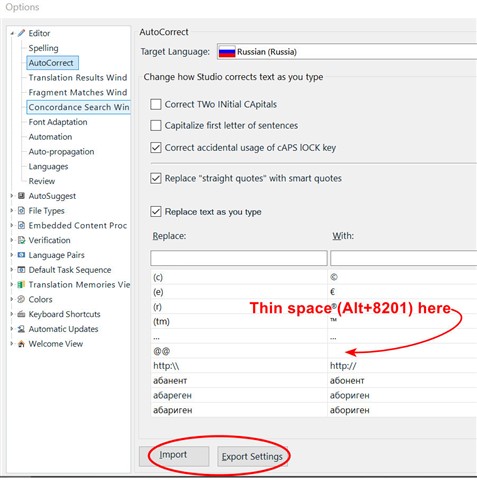

I just export my autocorrect file, amend it and then import it back. No matter where you save the export file.
By the way, this allows you to add entries that you can't add through Studio interface.
For example, there is no way to add an autocorrection pair for thin space (correct me anybody if I'm wrong). You can type it by Alt+8201 somewhere in text editor and then paste it but the 'Add' button won't be activated. The export/import workaround allows you to achieve this task.

