Translate



Hello everybody,
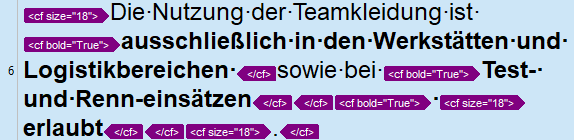
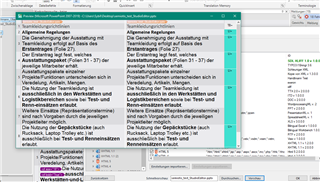
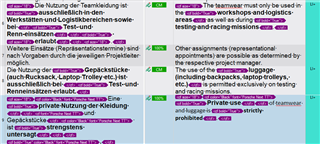
Quite recently, we are encountering issued in the Editor with the formatting in documents (see example below).
The formatting in the source segment is wrong, only some terms should be bold. It seems as if Studio places e.g. the bold end tag at the very end of the sentence before the next opening tag in row and not just around individual terms. This is a nuisance since we need to check every instance in the source document and correct it in the target segment. And even if it is corrected, the formatting might be incorrect in the target document again, not always but increasingly frequently.

This happens with bold, italic, superscript etc. And it happen on all our installations.
Does this have to do with any new trick in Office versions and is there anthing we can do about it?
Thanks and regards,
Angelika
Generated Image Alt-Text
[edited by: Trados AI at 1:48 AM (GMT 0) on 29 Feb 2024]