 Translate



Autopropage function does not work although autopropagate option is activated. What can I do?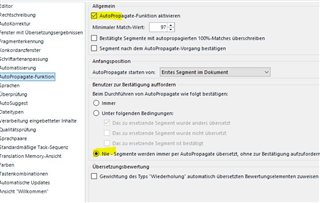
Generated Image Alt-Text
[edited by: Trados AI at 1:51 AM (GMT 0) on 29 Feb 2024]


Autopropage function does not work although autopropagate option is activated. What can I do?
All your segments are confirmed. Autopropagate will overwrite confirmed segments only if you select the corresponding option in the settings (Bestätigte Segmente ...).
You should also activate "Segment nach ... bestätigen", otherwise you will have to confirm each AP segment and wait until auto propagation for further not confirmed segments is finished.
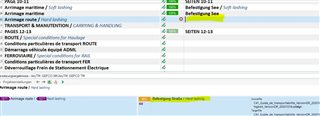
And on a side note: you have empty segments confirmed. This is quite bad, you should unconfirm these. Otherwise working with this file will be really problematic.
_________________________________________________________
When asking for help here, please be as accurate as possible. Please always remember to give the exact version of product used and all possible error messages received. The better you describe your problem, the better help you will get.
Want to learn more about Trados Studio? Visit the Community Hub. Have a good idea to make Trados Studio better? Publish it here.
All your segments are confirmed. Autopropagate will overwrite confirmed segments only if you select the corresponding option in the settings (Bestätigte Segmente ...).
You should also activate "Segment nach ... bestätigen", otherwise you will have to confirm each AP segment and wait until auto propagation for further not confirmed segments is finished.
And on a side note: you have empty segments confirmed. This is quite bad, you should unconfirm these. Otherwise working with this file will be really problematic.
_________________________________________________________
When asking for help here, please be as accurate as possible. Please always remember to give the exact version of product used and all possible error messages received. The better you describe your problem, the better help you will get.
Want to learn more about Trados Studio? Visit the Community Hub. Have a good idea to make Trados Studio better? Publish it here.

Great, thank you! Chosing the option "Bestätigte Segmente..." did not work though, so I just unconfirmed everything. Thank you!
