Use case question concerning importing enumerations in Word documents into Trados Studio

Dear all/reader,

I don't know if anybody ever had this issue before. I couldn't find anything online, but maybe there is a solution out there.

The issue is as follows.

When importing a Word Document with a proper enumeration lay-out into Trados (I use SDL Studio 2019), the numbers of the enumeration are not shown in the source segments in Trados.

When importing the same Word Document, but this time with the numbers simply typed in and not formatted in an enumeration lay-out, all the numbers are included in the source segments in Trados.

To give you an example, these numbers are:

1

1.1

1.2.

1.3

1.3.1

1.3.2

Etc.

Is there a way to have Trados exclude these numbers when importing the document, and add them again when exporting the final result?

I have tried several things, including manually adding them as variables to the TM, and having Trados recognize numbers before importing the document, but with little to no success so far.

Any help would be appreciated.

Parents
  • If the numbers are separated from text by a tab stop, you could use it for segmentation. However, if the numbers are not separated from text, it might be hard. You cannot simply segment on numbers, because numbers are also elements within segments.

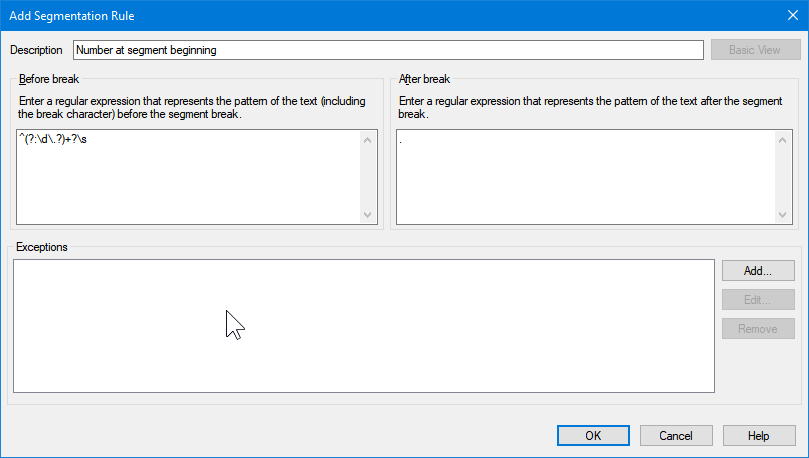
    You could try to add the following regex to your segmentation rules before segmenting the files, it might work:

    Trados Studio Add Segmentation Rule dialog box with 'Number at segment beginning' description. Regex (?:d.?)+?s entered in 'Before break' field. 'After break' field is empty.

    The idea behind is to capture only digits or a combination of digits and dots at the beginning of the segment.

    The regex is ^(?:\d\.?)+?\s and a simple dot (.) after break.

    _________________________________________________________

    When asking for help here, please be as accurate as possible. Please always remember to give the exact version of product used and all possible error messages received. The better you describe your problem, the better help you will get.

    Want to learn more about Trados Studio? Visit the Community Hub. Have a good idea to make Trados Studio better? Publish it here.

    emoji


    Generated Image Alt-Text
    [edited by: Trados AI at 2:22 AM (GMT 0) on 29 Feb 2024]
  • Hi Jerzy,

    Thanks for your help and for the explanation.

    I finally got round to trying it and it works! :-)
    It turns each group of digits at the start of the sentence into a separate segment, so it doesn't interfere with my TM anymore.

    Thanks a lot!!

    Could you explain the regex to me, or point me in the right direction to find the appropriate dictionary for each regex element you used?

Reply Children