
 Translate



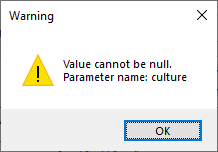
When trying to create a bilingual Excel file in Trados Studio 2021 with SR1 I get this message.
This seems to be a Windows message with very strange explanation, but maybe someone could look into it?
Without SR 1 it works, but the defined tag settings are not working properly (I tried to define quotation marks as external tags, but they remain internal and are included in the segment).
Generated Image Alt-Text
[edited by: Trados AI at 2:40 AM (GMT 0) on 29 Feb 2024]

