 Translate



Dear All,
I'd be grateful if anyone can help with the above error.
Whenever I open Trados, I get the same error "Failed to initialize view 'TranscreateManager_View'.
I've re-installed, repaired it, with no luck.
Thank you in advance.
Nidal

Dear All,
I'd be grateful if anyone can help with the above error.
Whenever I open Trados, I get the same error "Failed to initialize view 'TranscreateManager_View'.
I've re-installed, repaired it, with no luck.
Thank you in advance.
Nidal


Hi Oana,
Thank you for your reply.
Here it is.file:///C:/Users/Nidal/Desktop/sdlerror-2021416-11h30m57s.sdlerror.xml.
I couldn't do it as you said, maybe this will help.
Best
Nidal
Hi Nidal Monzer,
it does not help us, as that is the path in your PC, so we can't see the details.
Can you please highlight the whole of the error message then paste it here, instead?
Also, can you please confirm if you have the plugin "Trados Transcreate" installed?
Regards,
Oana Nagy | QA Engineer | RWS Group
Yes, in fact, the issue happened after I installed the plugin Trados Transcreate.
Thank you
Here it is Oana,
Thank you very much for your support.
Thank you. I could reproduce the issue and I'l pass it to the teams to have a look at it.
In the meantime, please remove the plugin, following these steps:
|
In order to solve this issue please follow the steps described below:
1. Click on Start and Search for the SDL Plugin Management. 2. Open SDL Plugin Management. 3. Find the Trados Transcreate plug-in and Uninstall it. 4. Open Studio and check if the error is still present. |
Regards,
Oana Nagy | QA Engineer | RWS Group
Thank you, Oana, but I don't have SDL Plugin Management on my PC. Should I download it?
Regards
Nidal
Not to mention that I can't find the Trados Translate anywhere, except the downloaded file from SDL Website. It's not in the plugins folder.
On the bottom taskbar of your Windows, go to "Search" ( the magnifying glass on the left corner,next to the Windows icon) and start typing "SDL Plugin Management".
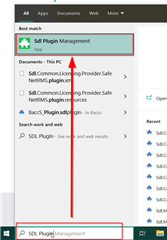
Oana Nagy | QA Engineer | RWS Group

Thank you, Oana.
I solved the issue. I searched for the plugin by name and it showed all the locations of the plugin. I deleted all of them, restarted my computer and now I'm able to open my Trados again. But the funny is I don't have SDL Plugin Management App. I guess I should download it from the App Store, right?
Anyways, thank you very much for your support.
Best
Nidal
Thank you, Oana.
I solved the issue. I searched for the plugin by name and it showed all the locations of the plugin. I deleted all of them, restarted my computer and now I'm able to open my Trados again. But the funny is I don't have SDL Plugin Management App. I guess I should download it from the App Store, right?
Anyways, thank you very much for your support.
Best
Nidal
Hi Nidal Monzer,
Following-up on this, please download and install "Reports Viewer Plus", that is needed for Transcreate to work correctly:
https://appstore.sdl.com/language/app/reports-viewer-plus/1120/
You can see the details here , as well, please feel free to check:
Let us know if all is well!
Regards,
Oana Nagy | QA Engineer | RWS Group