


XLIFF Embedded content

Hi folks,
I often translate xlf files with tags presented as plain text. I know how to convert all of them into placeholders (by checking the 'Enable embedded content processing' in XLIFF filetype settings), but I need to keep one particular type of tags starting with <img alt="............/> as plain text. I know that this regex <img\salt.*/> can capture what I need. But it captures and converts, while I need exactly the contrary: not convert it into a placeholder.
Put it shortly, I want all tags that contain img alt text to remain as plain text (unlike all other tags). Is it possible?
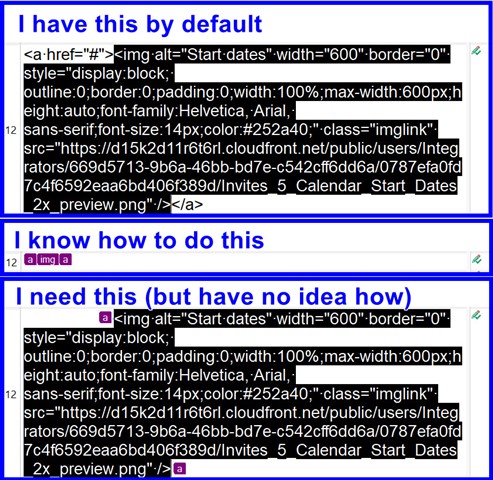
Screenshot of Trados Studio interface showing XLIFF file content with a default setting where tags are presented as plain text, including an 'img alt' tag.


Generated Image Alt-Text
[edited by: Trados AI at 2:05 AM (GMT 0) on 29 Feb 2024]

emoji
Parents
  • You need either to create separate rules for all tags or (provided source and target are filled with text) process xlf as xml and add html parser for embedded content, where you can declare, that parts of the img tag shall be translatable. If your xlf has just source and empty target, you can also open such xlf in Studio, copy all source to target and save as target. This way you get a xlf with source and target filled with the same text.

    However, provided your information, the best and easiest way here would be creating a proper parsing rules for the tags in the xlf.

    _________________________________________________________

    When asking for help here, please be as accurate as possible. Please always remember to give the exact version of product used and all possible error messages received. The better you describe your problem, the better help you will get.

    Want to learn more about Trados Studio? Visit the Community Hub. Have a good idea to make Trados Studio better? Publish it here.

Reply
  • You need either to create separate rules for all tags or (provided source and target are filled with text) process xlf as xml and add html parser for embedded content, where you can declare, that parts of the img tag shall be translatable. If your xlf has just source and empty target, you can also open such xlf in Studio, copy all source to target and save as target. This way you get a xlf with source and target filled with the same text.

    However, provided your information, the best and easiest way here would be creating a proper parsing rules for the tags in the xlf.

    _________________________________________________________

    When asking for help here, please be as accurate as possible. Please always remember to give the exact version of product used and all possible error messages received. The better you describe your problem, the better help you will get.

    Want to learn more about Trados Studio? Visit the Community Hub. Have a good idea to make Trados Studio better? Publish it here.

Children