


Can't select, edit, add or remove customers from the Customers window

Hi guys

I've been struggling with a strange phenomena ever since I upgraded to Trados 2021:

I can't select, edit, add or remove any customers from the list in the "Customers" window.

This is quite frustrating, as this is probably THE new feature I had been waiting for and now it doesn't work.

I still have to add my clients' names into the projects' "Name" field in order to know who the project was for, both for projects who have a Customer listed in the list of customers my projects.xml file and for project for new customers I'd like to add to my list of customers.

At the moment the main problem seems to be that the green "OK" button is permanently in "disactivated" mode, so if you'd like to select (specify) an existing customer for a project, add a new customer or edit an existing one, one can't click on the green "OK" button (I suppose to apply the selection/changes).

Any help would be appreciated, thanks!
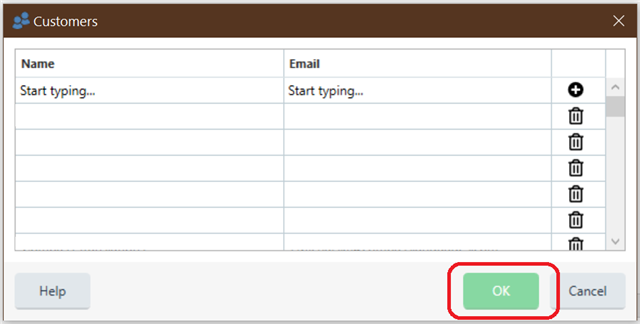
Trados Studio 'Customers' window with empty 'Name' and 'Email' fields. The 'OK' button is highlighted, indicating it is not clickable.


Generated Image Alt-Text
[edited by: Trados AI at 2:54 AM (GMT 0) on 29 Feb 2024]

emoji
Parents
  • Hi ,

    I'm just wondering if the reason behind is that you have edited manually the section Customers in the file projects.xml.

    Could you please try deleting manually the lines between <Customers> and </Customers>, leaving the opening and closing tags.

    ☛ Don't forget to make a copy of the XML, just in case something goes wrong.

    Now try adding a customer in Trados Studio and let us know if it works.

  • Hi 

    Thanks for your response!

    I tested that and your proposal worked, but obviously with such a "sophisticated" software as Trados you wouldn't expect to have to redo everything over nice and manually right from scratch...

    I played around a bit and thought to populate all the email fields that I hadn't put emails into and voila - all of a sudden the "greyed out" green "OK" button was active again. So the problem wasn't that I had created my own list manually for Trados 2021 from all my previous Trados project files (2015, 2017 and 2019), it was that I hadn't added email addresses for some of the clients that I had added into my projects.xml file.

    So, the "solution" is that one is not allowed to leave a single "Name" or "Email" field empty (in your projects.xml file) or else you'll never be able to use (or at least update) one's customer list in the Customers window.

    RWS, why should one have to add an email address for every single customer or else you can't add them?

    Why am I feeling like an SDL/RWS lab rat / guinea pig? :(

    -50 points for RWS!

    (Btw: "SDL" sounds better on the tongue than "RWS"! [less of a tongue-twister])

Reply
  • Hi 

    Thanks for your response!

    I tested that and your proposal worked, but obviously with such a "sophisticated" software as Trados you wouldn't expect to have to redo everything over nice and manually right from scratch...

    I played around a bit and thought to populate all the email fields that I hadn't put emails into and voila - all of a sudden the "greyed out" green "OK" button was active again. So the problem wasn't that I had created my own list manually for Trados 2021 from all my previous Trados project files (2015, 2017 and 2019), it was that I hadn't added email addresses for some of the clients that I had added into my projects.xml file.

    So, the "solution" is that one is not allowed to leave a single "Name" or "Email" field empty (in your projects.xml file) or else you'll never be able to use (or at least update) one's customer list in the Customers window.

    RWS, why should one have to add an email address for every single customer or else you can't add them?

    Why am I feeling like an SDL/RWS lab rat / guinea pig? :(

    -50 points for RWS!

    (Btw: "SDL" sounds better on the tongue than "RWS"! [less of a tongue-twister])

Children