 Translate



How can I run a 100% TM on a file. I created a TM for a file (16500 words) and I got only 52 lines in the TM.
Daniel explaned my last week, how to create a TM, and to 'let it grow' but I only got 52 llines, so I guess I did something wrong.

How can I run a 100% TM on a file. I created a TM for a file (16500 words) and I got only 52 lines in the TM.
Daniel explaned my last week, how to create a TM, and to 'let it grow' but I only got 52 llines, so I guess I did something wrong.
Hello Luuk Dijkhuis ,
The first thing to check here is actually to open the TM in the Translation Memory view
and check how many TU's you have selected to display
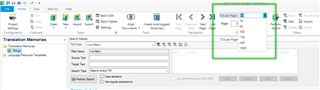
If the TM really does only have so few TU's, then we need to understand how are you updating the TM? via Batch Tasks or as you work?
Can you provide a screenshot of the file in the editor view, so we can see the segments statuses please.
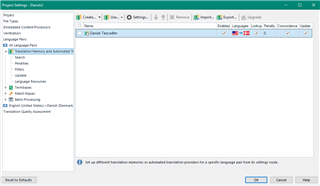
Also worth checking, is the Project settings and ensuring the TM really is enabled for update
Oana Nagy | QA Engineer | RWS Group

