Indicate titles and subheadings in SDL Trados Studio 2021

I want to know when a title or subheading is in the document (titles are subject to different capitalization rules)

I only see the text and not the tags

Screenshot of Trados Studio interface showing the title 'BIM Viewer' without visible tags.

Close-up view of Trados Studio code segment with a title tag for 'BIM Viewer'.

The tag itself remains a structured tag since a title is always its own segment.
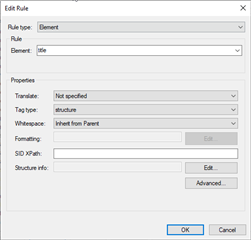
Trados Studio 'Edit Rule' dialog box with 'Element' set to 'title' and 'Tag type' as 'structure'.

Any suggestions?


Generated Image Alt-Text
[edited by: Trados AI at 2:09 AM (GMT 0) on 29 Feb 2024]

emoji
Parents Reply Children
  • I do, but I had to modify them.

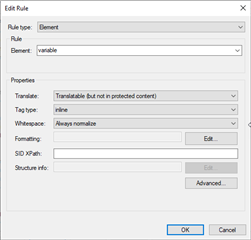
    I was having a problem with the //variable tag in the middle of the sentence: It was breaking up sentences into three segments (although I had it as inline).

    I experimented and found that changing the whitespace setting to "Always normalize" corrected the problem.  I have no idea what whitespace is and it took a while to figure out that inline is the old internal and structured is the old external. I find that the online help assumes the translator knows a lot about things like xml parsing.

    I have to find and correct this these as I am meeting deadlines, but I am getting closer....

    Thanks as always and regards,
    Eric

    Trados Studio Edit Rule dialog box showing settings for 'variable' element with 'Translate' set to 'Translatable but not in protected content', 'Tag type' set to 'inline', and 'Whitespace' set to 'Always normalize'.

    emoji


    Generated Image Alt-Text
    [edited by: Trados AI at 2:10 AM (GMT 0) on 29 Feb 2024]