Translate



Hi there, Trados community!
I have a problem that's very annoying with improper alphanumeric match recognition in Trados Studio 2021 16.0.1.2917.
Since it's for translating Qs&As, I have countless cases of A1., A2., A3., etc., which I must translate to R1., R2., R3., etc. I already confirmed dozens of such R+number, and yet, all I get as matches is as follows:
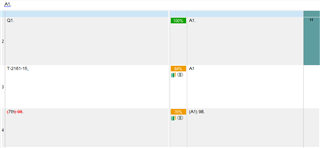
Worse than that, even though the R1., R2., R3... all the way to R14. are already confirmed and in the memory, EVERY TIME I confirm a Q1., Q2. or else, ALL my confirmed R's become A's.
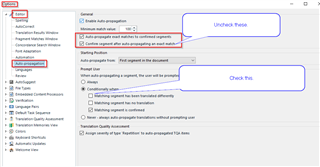
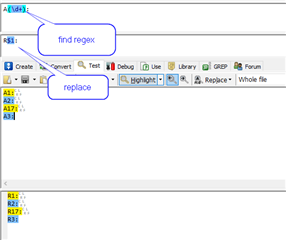
How can I at least prevent Trados from replacing already confirmed segments? Or, even better, how could I make it replace all instances of A1., A2., A3... A99. to R1., R2., R3... R99?
Generated Image Alt-Text
[edited by: Trados AI at 2:11 AM (GMT 0) on 29 Feb 2024]