
 Translate



This is the screen in the video “Getting the Most from your Translation Memories”. Please notice the little hand pointing to the left of the segment / title in 'orange' where presenter explains how to select all the segments by simply right-clicking and making selection.
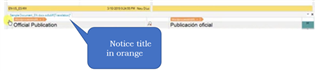
This is my screen. Notice that my document does not have the 'segment / title' in orange. ALL my documents do not have the little square where to point with the mouse to be able to select all the segments as the presenter explain. There is no OPEN tag/title in 'orange' (if that is the standard color).
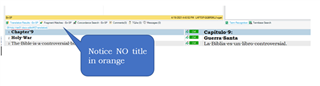
All the documents I checked have the CLOSED tag/title in 'orange' at the bottom of the document (I do not know what to call it)

Generated Image Alt-Text
[edited by: Trados AI at 2:10 AM (GMT 0) on 29 Feb 2024]


