


"Could not find any resources appropriate for the specified culture... baseName: Sdl.TranslationStudio.TranslationMemoryMigration.UI.plugin"

When I try to start Studio, I get this error message and when I click OK, the Studio startup process closes:
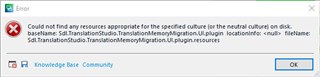
Error message in Trados Studio indicating missing resources for SDL Trados Compatibility and Migration Power Pack plugin.

It seems related to the plugin SDL Trados Compatibility and Migration Power Pack 2021 (I wish SDL could stop naming the plugins differently in the various places). It seems I caused the problem by not noting a warning in time and installed this version (1835) on top of the previous one (1798). When I try to uninstall the later one I get this message:
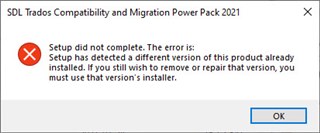
Setup error message for SDL Trados Compatibility and Migration Power Pack 2021 indicating a different version is already installed.

However, I am at a loss trying to locate "that version's installer". (It is not to be seen in the Control Panel.) What should I do? Until this problem is solved I cannot start Studio.


Generated Image Alt-Text
[edited by: Trados AI at 3:00 AM (GMT 0) on 29 Feb 2024]
emoji
Parents Reply Children
  • Thanks for your swift reply. Unfortunately, I can't uninstall the way you suggest, for this very strange reason: the name of this plugin starts with S and therefore is pretty low on the list of installed plugins. AND THERE IS NO WAY TO SCROLL! Nor can I change the type size.

    Someone must have slipped up. And I refuse to uninstall an unknown number of plugins above just to be able to see what I need.

  • For reasons unknown to mice and men SDL/RWS hid the plugin manager here: C:\Program Files (x86)\SDL\SDL plugin installer\Sdl.Community.SdlPluginInstaller.exe

    Note that this application you are having problems with isn't a plugin.  You need to download it, unzip it, then run the program installer which is not an sdlplugin.  So the plugin manager is not the tool for this job.

    I would suggest you uninstall Studio altogether, clean it up, and then reinstall the current CU5 build and download and install the correct app for this version.

    I do apologise for the confusion over this as we do have three apps now that have two different versions for 2021 because of some breaking changes to the internal APIs.  Normal apps won't be affected because they use the public APIs but these three are all using internal references that are not protected in the same way as the public API:

    • SDL Analyse
    • SDL Trados Compatibility and Migration Power Pack
    • Worldserver Compatibility Pack for SDL Trados Studio

    I did try to make the warning as big as possible in the top of the description for each of these apps so that users would read it, also written in capitals with IMPORTANT at the start.  It was also in the release notes.  But I guess the more familiar you are with the software the less likely you are read anything at all.  Not your fault though!!

    If you still can't solve it let us know and we'll log a support case so you get some help from the technical team.

    Paul Filkin | RWS

    Design your own training!
    You've done the courses and still need to go a little further, or still not clear? 
    Tell us what you need in our Community Solutions Hub

  • OK; thanks for all advice. I can tell you that I had already tried running the program installer (i.e. the one for the not-CU5 version of Studio). It did not help, though. So it seems I have to bite the bullet and uninstall everything. But what do you mean by "clean it up"?

    But I have a problem with the current CU5 build: I cannot log in to my SDL account; I am told that the password is wrong. It is not, though: it works fine with the pre-CU5 SR! version.

    BTW: I did notice the warning (and it is big), but this app was one of a number of plugins/apps that I downloaded/installed and I was too quick.