


"Could not find any resources appropriate for the specified culture... baseName: Sdl.TranslationStudio.TranslationMemoryMigration.UI.plugin"

When I try to start Studio, I get this error message and when I click OK, the Studio startup process closes:
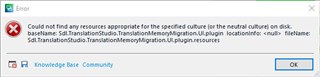
Error message in Trados Studio indicating missing resources for SDL Trados Compatibility and Migration Power Pack plugin.

It seems related to the plugin SDL Trados Compatibility and Migration Power Pack 2021 (I wish SDL could stop naming the plugins differently in the various places). It seems I caused the problem by not noting a warning in time and installed this version (1835) on top of the previous one (1798). When I try to uninstall the later one I get this message:
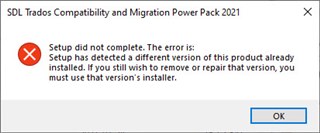
Setup error message for SDL Trados Compatibility and Migration Power Pack 2021 indicating a different version is already installed.

However, I am at a loss trying to locate "that version's installer". (It is not to be seen in the Control Panel.) What should I do? Until this problem is solved I cannot start Studio.


Generated Image Alt-Text
[edited by: Trados AI at 3:00 AM (GMT 0) on 29 Feb 2024]
emoji
Parents Reply
  • Thanks. But I'm not sure about the topic for this case -- it seems to be concerned with the problem more or less caused by myself by installing the wrong version of the plugin.

    Another, quite different problem, is that I cannot use my own password to log in to Language Cloud from the CU5 build. The problem is further aggreviated by the fact that when I click Don't remember the password? and thus ask RWS to send me an email where I can reset the password, such an email never arrives.

    I should add that exactly the same problem was caused by an earlier build, possibly CU4. It got its solution by the fact that the final version of the CU worked as it should. So maybe I only need to wait a few days.

    Still, it is irritating with these two glitches in the CU beta and the fact that they seem to recur -- quite possibly this will happen again with CU6.

Children
No Data