
 Translate



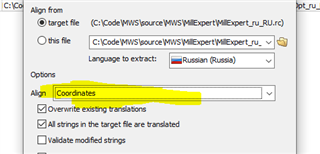
Another developer in our organization used Visual Studio to update dialog text coordinates for a very large C++ resource file (.RC file)
I can't figure out how to import those changes ... When I run Scan Target file, no matter what options I select, the coordinates are still the old ones when I run the Generate Target File.
How can I access the change coordinates so when I Generate Target File they don't revert to the old again?
Generated Image Alt-Text
[edited by: Trados AI at 2:20 AM (GMT 0) on 29 Feb 2024]

