 Translate



Hi,
Can someone please help me with the following problem? I need to align two documents in Trados, but when I add a TM, I get this message: Object reference not set to an instance of an object. What should I do to solve this problem?
Sofia.

Hi,
Can someone please help me with the following problem? I need to align two documents in Trados, but when I add a TM, I get this message: Object reference not set to an instance of an object. What should I do to solve this problem?
Sofia.
Hello @Sofia
Please post the full error stack as this is otherwise a very generic error message that doesn't provide us with any information.
Please also confirm the exact version of Trados Studio you are running and what files you are trying to align.
Oana Nagy | QA Engineer | RWS Group

Hello Steven,
First, I click on Align documents > +Add > select the TM from the list > OK - and this is when I get the message "Object reference not set to an instance of an object".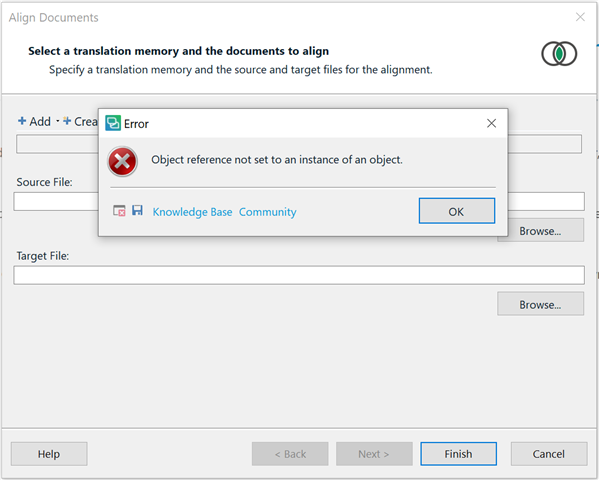
It happens even before I open the files I need to align (a word document and a PDF document). I tried to first open the files and then add a TM, but the same error message keeps appearing. I use SDL Trados Studio 2017.
Hello @Sofia,
Please save the error message by clicking on the 'blue floppy disk icon' as indicated.
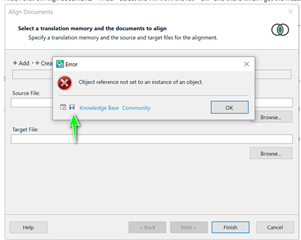
You can then save the xml and attach to the thread using the insert option.
Oana Nagy | QA Engineer | RWS Group
Hello @Sofia,
Please save the error message by clicking on the 'blue floppy disk icon' as indicated.
You can then save the xml and attach to the thread using the insert option.
Oana Nagy | QA Engineer | RWS Group
Steven,
Sorry, now I got what you meant 
<SDLErrorDetails time="5/4/2021 5:53:32 PM">
  <ErrorMessage>Object reference not set to an instance of an object.</ErrorMessage>
  <Exception>
    <Type>System.NullReferenceException, mscorlib, Version=4.0.0.0, Culture=neutral, PublicKeyToken=b77a5c561934e089</Type>
    <HelpLink />
    <Source>Sdl.TranslationStudio.TranslationMemoryManager</Source>
    <HResult>-2147467261</HResult>
    <StackTrace><![CDATA[   at Sdl.TranslationStudio.TranslationMemoryManager.ServerBasedTranslationMemoryManagementObject.RefreshTranslationMemory()
   at Sdl.TranslationStudio.AlignmentEditor.Wizards.TranslationMemoryData.get_TranslationMemory()
   at Sdl.TranslationStudio.AlignmentEditor.Wizards.TranslationMemoryData.SetTmLanguageDirection(LanguagePair languagePair)
   at Sdl.TranslationStudio.AlignmentEditor.Wizards.TranslationMemoryData.SetTranslationMemory(ITranslationMemory translationMemory)
   at Sdl.TranslationStudio.AlignmentEditor.Wizards.AlignDocumentsWizard.AlignDocumentsWizardPage.UpdateSiteData()
   at Sdl.TranslationStudio.AlignmentEditor.Wizards.AlignDocumentsWizard.AlignDocumentsWizardPage.ControlOnTranslationMemoryValueChanged(Object sender, EventArgs eventArgs)
   at Sdl.TranslationStudio.AlignmentEditor.Wizards.AlignDocumentsWizard.AlignDocumentsWizardControl.selectTranslationMemoryControl_TranslationMemoryValueChanged(Object sender, EventArgs e)
   at Sdl.TranslationStudio.TranslationMemoryManager.Controls.SelectTranslationMemoryControl.OnTranslationMemoryValueChanged()
   at Sdl.TranslationStudio.TranslationMemoryManager.Controls.SelectTranslationMemoryControl._addServerbasedTMToolStripMenuItem_Click(Object sender, EventArgs e)
   at System.Windows.Forms.ToolStripItem.RaiseEvent(Object key, EventArgs e)
   at System.Windows.Forms.ToolStripMenuItem.OnClick(EventArgs e)
   at System.Windows.Forms.ToolStripItem.HandleClick(EventArgs e)
   at System.Windows.Forms.ToolStripItem.HandleMouseUp(MouseEventArgs e)
   at System.Windows.Forms.ToolStripItem.FireEventInteractive(EventArgs e, ToolStripItemEventType met)
   at System.Windows.Forms.ToolStripItem.FireEvent(EventArgs e, ToolStripItemEventType met)
   at System.Windows.Forms.ToolStrip.OnMouseUp(MouseEventArgs mea)
   at System.Windows.Forms.ToolStripDropDown.OnMouseUp(MouseEventArgs mea)
   at System.Windows.Forms.Control.WmMouseUp(Message& m, MouseButtons button, Int32 clicks)
   at System.Windows.Forms.Control.WndProc(Message& m)
   at System.Windows.Forms.ScrollableControl.WndProc(Message& m)
   at System.Windows.Forms.ToolStrip.WndProc(Message& m)
   at System.Windows.Forms.ToolStripDropDown.WndProc(Message& m)
   at System.Windows.Forms.Control.ControlNativeWindow.OnMessage(Message& m)
   at System.Windows.Forms.Control.ControlNativeWindow.WndProc(Message& m)
   at System.Windows.Forms.NativeWindow.Callback(IntPtr hWnd, Int32 msg, IntPtr wparam, IntPtr lparam)]]></StackTrace>
  </Exception>
  <Environment>
    <ProductName>SDL Trados Studio</ProductName>
    <ProductVersion>14.0.0.0</ProductVersion>
    <EntryAssemblyFileVersion>14.1.10018.54792</EntryAssemblyFileVersion>
    <OperatingSystem>Майкрософт Windows 10 Корпоративная</OperatingSystem>
    <ServicePack>NULL</ServicePack>
    <OperatingSystemLanguage>1049</OperatingSystemLanguage>
    <CodePage>1251</CodePage>
    <LoggedOnUser>PTSECURITY\SKorobkova</LoggedOnUser>
    <DotNetFrameWork>4.0.30319.42000</DotNetFrameWork>
    <ComputerName>SKOROBKOVA</ComputerName>
    <ConnectedToNetwork>True</ConnectedToNetwork>
    <PhysicalMemory>16745756 MB</PhysicalMemory>
  </Environment>
</SDLErrorDetails>
Hello @Sofia
First close Studio and then navigate to the following folder
C:\Users\YourName\AppData\Local\SDL\SDL Trados Studio\14.0.0.0
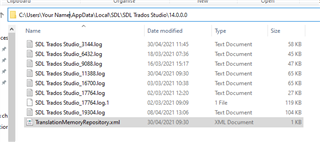
And now right click the TranslationMemoryRepository.xml and rename- adding something like _old
If you cant find this folder- then enable Hidden items

Restart Studio and see if the problem is now fixed.
Oana Nagy | QA Engineer | RWS Group
Hello Steven,
It worked! Thank you so much for your help.
Sofia.

