
 Translate



Hello! As the built in number-verification for Trados only tells you if there is a mismatch between the source and target (but not the number affected), I made my own Regular Expression filter to do the job. The filter works great, but the problem is that Trados is saying a number from the Source has been changed even when that exact number is found in the Target.
Take a look at these examples:
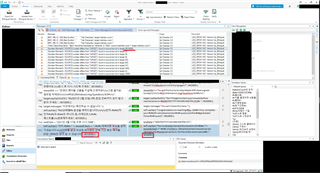


As you can see, in every situation, the exact number the filter has captured is found in both the Source and Target, without any modifications, yet the QA Checker is reporting the number as not found in the Target. This primarily occurs in cells that have more than one number, and may have something to do with the order in which the QA Checker is detecting the numbers. The aforementioned is not something that could be practically fixed by modifying my filter.
My Regular Expression is as follows:
RegEx Source:
| (?!(#fs)?\d+\.?,?\d*,?\d*[만백천억년월일시분#])(\d+(\.?,?\d*,?\d+)*)[^만백천억년월일시분#]? |
RegEx Target:
| $2 |
Condition:
|
Grouped search expression - report if source matches but not target |
What the Filter Does:
- Captures any number, including those containing periods or commas, but excluding trailing periods and commas, and ignoring any results which are dates or contain counter words (i.e. 10만 = 10 ten-thousands, and I have a separate filter for counters). Also ignores any results containing the font size markup tag #fs.
- Then checks for the captured number in the Target.
In a file with more than 80,000 words, this can create a lot of false error message spam. Please advise!
Generated Image Alt-Text
[edited by: Trados AI at 2:21 AM (GMT 0) on 29 Feb 2024]


