Translate



Dear experts,
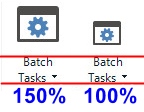
After the last update I have very big icons with same small captions. How can I remove this "improvement"?
Previously I could mitigate this problem using the Windows scaling feature. Now, when I scale it to 150%, captions remain the same size while icons expand so much that they spill off their boxes. It did not happen before the recent update to 16.1.5.4270.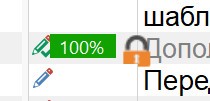
Thank you
Generated Image Alt-Text
[edited by: Trados AI at 2:24 AM (GMT 0) on 29 Feb 2024]