


WorldServer Package downloaded, has checks in the Plug-ins tab, processes package but shows "Unexpected error occurred while loading the App plug-in"

As the subject states, this "unexpected error ..." always displays on loading Studio 2021 albeit WorldServer package is processed and project packs, too. How to get rid of this error message? I deinstalled Studio 2021 and WorldServer Components 2021, ran CCleaner, reinstalled everything but to no avail. Can anybody help?

PS: I have Studio 2021+ on 2 PCs. The described effect takesplace on my main PC. The standby PC has the same configuration. The App was executed there in the same way like on the master PC. The standby unit runs Studio 2021 absolutely without any issue. The O/S on the master PC is (sadly) WIN 7, on the standby unit WIN 8.1

  • Hello @

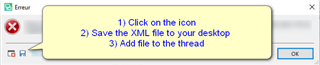
    As always its very important that you provide the full error stack as this often contains useful information.

    Error message dialog box with instructions: 1) Click on the icon, 2) Save the XML file to your desktop, 3) Add file to the thread.

    I do however, rather suspect the issue is linked with Windows 7- for which neither Trados Studio 2021 or the WorldServer app will have been tested on.

    AS MS retired support for Windows 7 nearly 18 months ago, we too, are no longer able to offer technical support for W7 environments.

    It is probably worth considering upgrading to Windows 10, as issues with W7 machines will only increase and we are unlikely to be able to help or offer workarounds.

    Oana Nagy | QA Engineer | RWS Group

    emoji


    Generated Image Alt-Text
    [edited by: Trados AI at 2:25 AM (GMT 0) on 29 Feb 2024]
