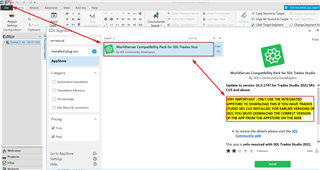
Cannot open wsxz packages with plugin installed

I have Studio 2021 SR1 - 16.1.5.4270 (no updates available). I have installed the World Server plugin (the version for SR1), and the Open Worldserver Package button is on the ribbon, but when I try to open a wsxz package I still get the Method Not Found error. It used to work, but I think I might have upgraded Studio since I installed the plugin, could that be it? I just reinstalled the plugin, but that didn't help. Can anyone help?

Parents Reply
  • Hi Oana,

    Thanks for taking the time to help! Yes, I downloaded a msi file from the app store on the web. I did read something about what you mention, but I am not sure if I have the "CU5" version - it doesn't say anywhere that my version is the "CU5" version, only that it is SR1 (and a version and build number). This is part of the problem - SDL is not very consistent or clear in their communication or in how they name their versions. Do you know for a fact that my version is the CU5 version?

    If so, can you tell me how to uninstall my current version of the plugin? It is not on the list of installed plugins in Studio (when pressing the SDL AppStore button on the Add-Ins ribbon). It is, however, on the list where I can deactivate it (when pressing the Plug-Ins button on the same ribbon) - will it be enough to deactivate it? Secondly, what should I search for in the app store to find the plugin? Searching on "worldserver" or "wsxz" returns zero hits.

Children