
 Translate



Hello,
This is the third time I am posting my question but I did not have a final answer !
I have a bug with my termbases. Abd I need a precise answer because Iam losing my ime with something that is supposed to work: but it is not...
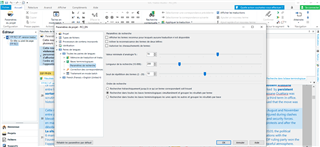
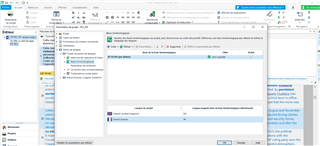
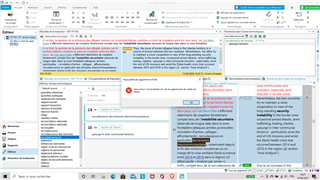
2 months ago I unstalled SDL trados studio 2019 on my former computer to reinstall it on the new one. Since then, I’ve been able to add new terms to my termbase but the Term Recognition does not work properly. Sometimes I cannot see the red line in the Editor usually highlighting the terms already known in the termbase. And sometimes I cannot see terms I just added on the Term Recognition window... It depends... For some segments this is working, for others not: I don't get it ...
Moreover, when I am typing a term in French in the window for termbases I can find it, but when I am typing it in English it does not appear.
Finally, and since yesterday, when I am adding a term, my software (SDL studio) sometimes freezes and I need to restart my computer …
Could you help me with this problem?
I tried a lot of solutions but nothing works… I thought may be the problem comes from the place where I store my BT. I created a personal file and move my TB and TM in this file: may be I should have avoided to change this “path” and should have continued storing it in “Documents”→ “SDL” → “SDL Multiterm” → “Termbases”.
My version of sdl studio : SDL Trados Studio SR2 - 15.2.8.3007
And my version of Multiterm : 15.0.6.56482
I attached 4 files with the termbase for my project: for you to see if the parameters are ok. And to answer Steven again: yes I tried opening my TB with a new project. This is precisely the problem!
What should I do?
Thanks for your help in advance!
Charlotte

Generated Image Alt-Text
[edited by: Trados AI at 2:31 AM (GMT 0) on 29 Feb 2024]

