
 Translate



I am trying out Studio 2021 now (they fixed a problem that was preventing me from using it earlier) and the following may seem nitpicky, but it's sooo aggravating.
Situation:
I have Studio ask me for confirmation on every auto-propagation instance. Usually I select "Yes to all" with Alt-A and move along to the next unit. There's a difference however if I use Ctrl-Enter (Confirm and move to next segment) or Alt-Enter (Confirm and move to next unconfirmed segment) to confirm the unit.
If I use Ctrl-Enter there is never a problem. Studio happily moves to the next unit after I confirm with "Yes to all" (Alt-A), and I continue working.
If I use Alt-Enter though and then use Alt-A to confirm the auto-propagation, then the auto-propagation takes place and I move to the next unconfirmed segment, but the "Alt" lingers on a bit and activates the ribbon shortcuts at the top of the software.

Trados then misbehaves unless I notice this and press Esc to get things back to normal. If I don't (and it's easy to miss - which makes it so aggravating), then I usually find myself here:
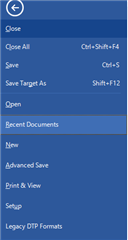
For example, after I press the down arrow to "navigate around the segment". Then I need to figure out a way to get back to my translation.
Again, this never happens when I confirm with Ctrl-A. ANNND....if I sloooowly apply Alt-A (hold down Alt for a second and then press A) to the auto-propagation after Alt-Enter, then this problem also doesn't happen.
Since this never happened in Studio 2019, I'm hoping someone will see this, confirm it and pass it on to the developers for me.
Generated Image Alt-Text
[edited by: Trados AI at 2:33 AM (GMT 0) on 29 Feb 2024]

