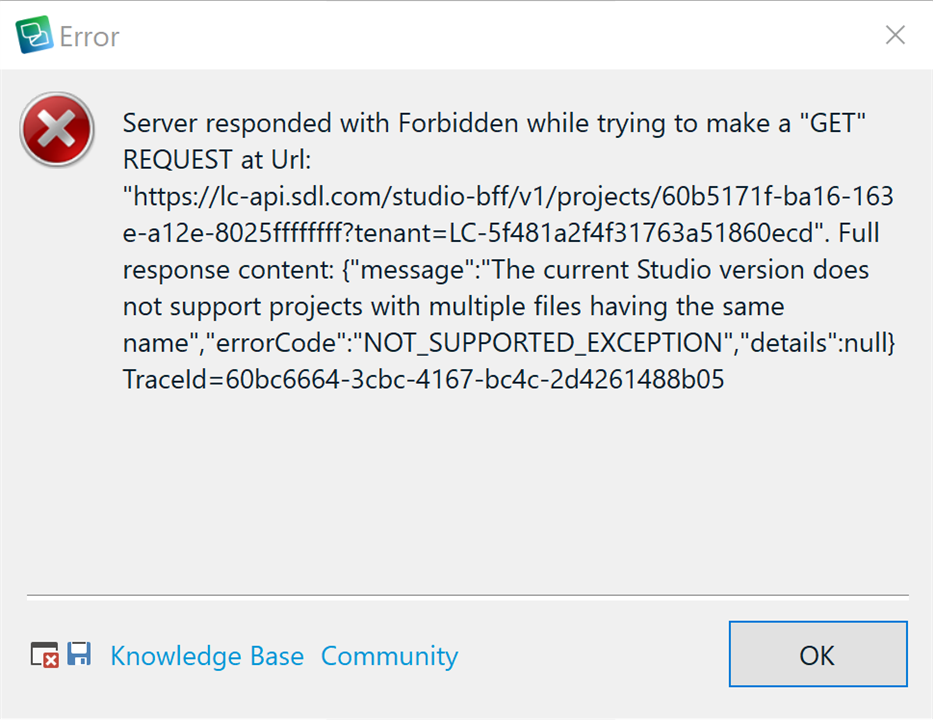
Error message when trying to create a new cloud project

I have tried to start a new cloud project and I get the error message:

"The current Studio version does not support multiple projects having the same name"

I am using Trados Studio 2021 Freelance version.

I had some difficulties since I downloaded OneDrive by mistake and it corrupted my local projects.

Because of this I had to reboot my laptop, reset my license and re-install the program.

I want to use the cloud version to avoid loosing translation work in the future and I do not get the error message since this is my first cloud project on the rebooted laptop.

I would appreciate if someone could help me on this.

Parents
  • Have you got a project with the same name already?  What happens if you create a cloud project with a completely new name?

    Paul Filkin | RWS

    Design your own training!
    You've done the courses and still need to go a little further, or still not clear? 
    Tell us what you need in our Community Solutions Hub

  • Hi Paul,

    I had a project stored locally with same name, but this is now deleted because of the problems I had with OneDrive.

    I also made trials where I gave the cloud project a slightly different name, but I still got the same error message.

    On another note I see the OneDrive re-installed itself although I uninstalled it earlier. Is there any possibility to change the location of SDL and Studio 2021 folder? I understand they go to the Documents folder automatically when installing. I would rather have them in another separate folder if possible.

  • I had a project stored locally with same name, but this is now deleted because of the problems I had with OneDrive.

    I also made trials where I gave the cloud project a slightly different name, but I still got the same error message.

    Perhaps... given these problems, you should simply delete the projects.xml file here:

    c:\Users\[USERNAME]\Documents\Studio 2021\Projects\projects.xml

    This will remove all references to any projects in Studio and you'll have a clean sheet.  Then add back in any projects you want to keep one at a time, and recreate whatever you need in the cloud.  It won't delete your projects, it will only unload them from the Studio interface.

    Is there any possibility to change the location of SDL and Studio 2021 folder?

    The installation no.  But you can save your projects wherever you like.  That's best controlled through the use of project templates as you can specify the location for projects in the template itself.  This also means you can control multiple locations for your projects if you like.

    On the use of One Drive for your projects.  I would not recommend this.  One Drive is completely unreliable as an application anyway (in my own frustrated experience... others may like it), and it's risky to work with a location that only works as efficiently as an internet connection.  It can be responsible for corrupt TMs and Trados Studio projects.

    Paul Filkin | RWS

    Design your own training!
    You've done the courses and still need to go a little further, or still not clear? 
    Tell us what you need in our Community Solutions Hub

Reply
  • I had a project stored locally with same name, but this is now deleted because of the problems I had with OneDrive.

    I also made trials where I gave the cloud project a slightly different name, but I still got the same error message.

    Perhaps... given these problems, you should simply delete the projects.xml file here:

    c:\Users\[USERNAME]\Documents\Studio 2021\Projects\projects.xml

    This will remove all references to any projects in Studio and you'll have a clean sheet.  Then add back in any projects you want to keep one at a time, and recreate whatever you need in the cloud.  It won't delete your projects, it will only unload them from the Studio interface.

    Is there any possibility to change the location of SDL and Studio 2021 folder?

    The installation no.  But you can save your projects wherever you like.  That's best controlled through the use of project templates as you can specify the location for projects in the template itself.  This also means you can control multiple locations for your projects if you like.

    On the use of One Drive for your projects.  I would not recommend this.  One Drive is completely unreliable as an application anyway (in my own frustrated experience... others may like it), and it's risky to work with a location that only works as efficiently as an internet connection.  It can be responsible for corrupt TMs and Trados Studio projects.

    Paul Filkin | RWS

    Design your own training!
    You've done the courses and still need to go a little further, or still not clear? 
    Tell us what you need in our Community Solutions Hub

Children