3 target languages supported - Studio 2021 Freelance Plus license

Hi, 

I bought a Studio 2021 Freelance Plus licence 2 months ago and was very happy as I noted all languages were supported with this new version. So I could with files from French into any languages. And suddenly, since last week, whenever I try to create a package for several files from French into Dutch for a single project, I receive a message saying the licence I have can only support projects into 3 target languages. And I'm pompted to deleted all additional target languages from the default model project. So I uninstalled Studio, but I've never asked to select any target languages. So I'm not sure how I should proceed. Can you help on this? 
Thanks,

Elisabeth

Parents Reply
  • I wonder if this is because you have multiple target languages in your default project template?  The language restriction has been lifted in the 2021 FL, but there is still a restriction.  You can only have up to three different target languages in your project when you create a project.

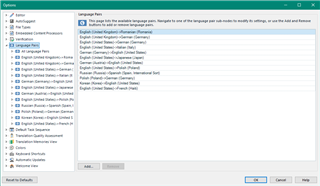
    Try going to here and remove any language pairs you don't need.  Or, just create a new project template that only contains the languages you want:

    Trados Studio settings window showing a list of language pairs with English (United States) as the source and five different target languages.

    You can see I have five target languages for an en-US source, so with the Freelance version this would cause a problem when creating the project.  Simple workaround though... just use project templates.

    Paul Filkin | RWS

    Design your own training!
    You've done the courses and still need to go a little further, or still not clear? 
    Tell us what you need in our Community Solutions Hub

    emoji


    Generated Image Alt-Text
    [edited by: Trados AI at 2:41 AM (GMT 0) on 29 Feb 2024]
Children