Translate



Hi everyone,
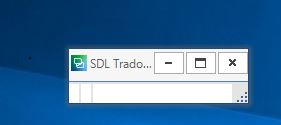
When I open Studio, unless you have very good eyesight it is difficult to find it on the screen - see the image below. I can resize it manually, of course, so this is not a major issue, it's just one of those annoying little things. It happened once before, a long time ago, so I can't remember how to fix this.
Can anybody help? Thanks!
Generated Image Alt-Text
[edited by: Trados AI at 2:56 AM (GMT 0) on 29 Feb 2024]