Issues with TMs: various TM duplicates + unsuccessful updates (Studio 2019)

Hello,

I very often get TM duplicates called Conflict without knowing what they are, what to do with them or how to reuse them, and I can't find any solution in the community. I usually delete these Conflict TMs as I think I tried using them once and it was impossible, and I clearly miss a lot of segments now, which is a huge loss of productivity.

Screenshot showing Trados Studio with two Translation Memories listed, one labeled as 'Conflict' with a timestamp.

Could you please advise?

Besides, since I downloaded the last version (SR2 if I am not mistaking) OR since I started using MT OR since I started using a client server (I have no clue, it was all at the same time), I also get TM update issues:

Error message in Trados Studio indicating a TM update issue with the message 'An error occurred while updating the translation memory'. here in the message while translating

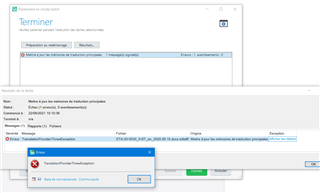
Trados Studio Batch Task window with an error message 'Error: TranslationProviderTranslationException' and a detailed exception message.here in the Batch Mode when trying to update the main TMs (above all to update multiple entries when using AnyTM)

However, when I open the TMs in the Translation Memory menu to check some sentences, it seems like all segments are saved...

This week, I also noticed something that could be related to this as well, meaning that the issue could go far beyond this problem. This a screenshot from my client's server, on which all translators are continuously connected as it is real time sharing (I don't know how to say that, sorry):

Screenshot of a Translation Memory name on a client's server with the user's name and a date appended, indicating a duplicate TM issue. (I hid the client's name at the beginning)

I never used this TM, certainly not on that day (2 days ago) as I was working with another TM on the server, however you can see that my name + the date on which I checked the serveur (yesterday) have been added to the TM name - and it doesn't come from the client!
This is a duplicate from a TM starting the same way but simply ending in DEDE-FRFR (but good news, we can still find it on the server). There are 3 TMs for which we can find this kind of duplicate with my name and the date.

Could there possibly be a relation between those issues?? Could we find a solution? Thanks a lot!


Generated Image Alt-Text
[edited by: Trados AI at 3:03 AM (GMT 0) on 29 Feb 2024]
emoji
  • you can see that my name + the date on which I checked the serveur (yesterday) have been added to the TM name

    I mean by my name "PGXtraduction" and French date "juin-22"

  • Hello ,

    Its always helpful if you can post the full error stack-

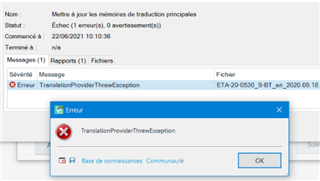
    Trados Studio error message window showing 'Erreur TranslationProviderThrowException' with an 'OK' button.

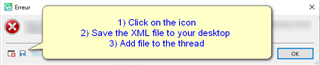
    You can do this as follows

    Instructional error message in Trados Studio with steps: 1) Click on the icon, 2) Save the XML file to your desktop, 3) Add file to the thread.

    As it appears you are also working with GroupShare- the following article might be useful for you-

    gateway.sdl.com/.../communityknowledge

    Oana Nagy | QA Engineer | RWS Group

    emoji


    Generated Image Alt-Text
    [edited by: Trados AI at 3:03 AM (GMT 0) on 29 Feb 2024]
  • Hello Steven,

    Thank you. Here is the XML file - I don't use GroupShare (I work with my client's own server, not GroupShare).

    <SDLErrorDetails time="24/06/2021 11:54:53">
      <ErrorMessage>TranslationProviderThrewException</ErrorMessage>
      <Exception>
        <Type>Sdl.ProjectApi.ProjectApiException, Sdl.ProjectApi, Version=15.1.0.0, Culture=neutral, PublicKeyToken=c28cdb26c445c888</Type>
        <HelpLink />
        <Source />
        <HResult>-2146233088</HResult>
        <StackTrace><![CDATA[]]></StackTrace>
        <InnerException>
          <Type>Sdl.ProjectApi.ProjectApiException, Sdl.ProjectApi, Version=15.1.0.0, Culture=neutral, PublicKeyToken=c28cdb26c445c888</Type>
          <HelpLink />
          <Source />
          <HResult>-2146233088</HResult>
          <StackTrace><![CDATA[]]></StackTrace>
        </InnerException>
      </Exception>
      <Environment>
        <ProductName>SDL Trados Studio</ProductName>
        <ProductVersion>15.0.0.0</ProductVersion>
        <EntryAssemblyFileVersion>15.2.8.3007</EntryAssemblyFileVersion>
        <OperatingSystem>Microsoft Windows 10 Professionnel</OperatingSystem>
        <ServicePack>NULL</ServicePack>
        <OperatingSystemLanguage>1036</OperatingSystemLanguage>
        <CodePage>1252</CodePage>
        <LoggedOnUser>PGXTRADUCTION\PGX</LoggedOnUser>
        <DotNetFrameWork>4.0.30319.42000</DotNetFrameWork>
        <ComputerName>PGXTRADUCTION</ComputerName>
        <ConnectedToNetwork>True</ConnectedToNetwork>
        <PhysicalMemory>8252656 MB</PhysicalMemory>
      </Environment>
    </SDLErrorDetails>