Studio 2021 Object reference.... When preparing file

I upgraded to 2021 in April and since then I consistently get fails and messages about "Object not set to a reference...." when I prepare files for translation. 

Here is a screen shot of the most recent: 
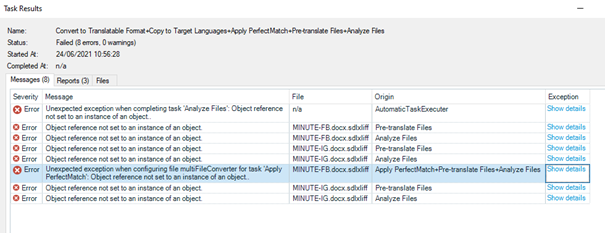
Screenshot of Trados Studio Task Results showing multiple errors with message 'Object reference not set to an instance of an object' for file preparation tasks.

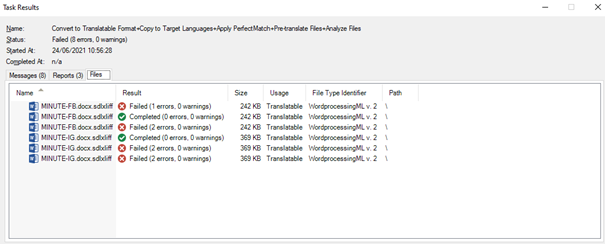
Screenshot of Trados Studio Task Results displaying file statuses, with several files marked as 'Failed' and others as 'Completed' with no errors or warnings.

This happens with all files: files I have created from converted PDFs on my own computer, Word files from clients and XLIFF files from clients. 

If I run the preparation a second time, the files are usually translatable but there is no "pre-translate" and the "analysis" is blank. 

I have absolutely no idea how to correct this and all my searches for "Object not set to a reference..." lead me to other mysterious problems. 

This is becoming an enormous time-waster. Just now more than an hour trying to get two files of 4K words each prepared for an urgent translation. 


Generated Image Alt-Text
[edited by: Trados AI at 3:04 AM (GMT 0) on 29 Feb 2024]
emoji
Parents
  • Hello ,

    Are you using loca/ server based TermBase?

    If you disable the Match Repair option in Studio then try to prepare the files, does the issue still persist?

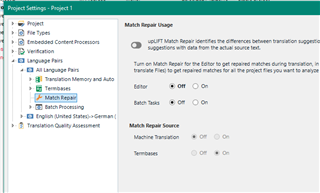
    Trados Studio Project Settings window showing Match Repair option turned on under Translation Memory and Automated Translation section.

    If so- are you able to Create a Single file translation in Studio- open the file and then immediately save as without translating anything?

    If there is still a problem at this stage, then it would appear the actual source file is the problem /or there are invalid characters in the sdlxliff.

    Oana Nagy | QA Engineer | RWS Group

    emoji


    Generated Image Alt-Text
    [edited by: Trados AI at 3:04 AM (GMT 0) on 29 Feb 2024]
  • My termbases are on the local computer. (They are quite large - in six parts because of the size).

    I did as you suggested. Turned off all match repair. But the results are still "Object not...." No other explanation. It's not the files, even with the errors reported, I can still open and translate the files and save the files and generate target files. 

    But when I open to start the translation, the target segments are completely empty (not even any machine translations or 100% matches).

    One thought, though. I am using the "Projects" originally created under 2019 and just changing the "Project Settings" slightly.... I've added the Language Cloud since upgrading. 

Reply
  • My termbases are on the local computer. (They are quite large - in six parts because of the size).

    I did as you suggested. Turned off all match repair. But the results are still "Object not...." No other explanation. It's not the files, even with the errors reported, I can still open and translate the files and save the files and generate target files. 

    But when I open to start the translation, the target segments are completely empty (not even any machine translations or 100% matches).

    One thought, though. I am using the "Projects" originally created under 2019 and just changing the "Project Settings" slightly.... I've added the Language Cloud since upgrading. 

Children