


Rapid Add Terms aus dem App Store

Nach Installation von SR2 (Release aus dem Monat Dezember 2021) kann ich die Funktion von Rapid Add Terms nicht nutzen, zudem ist der Funktion für das Hinzufügen von Schnellbegriffen ebenfalls ausgegraut.
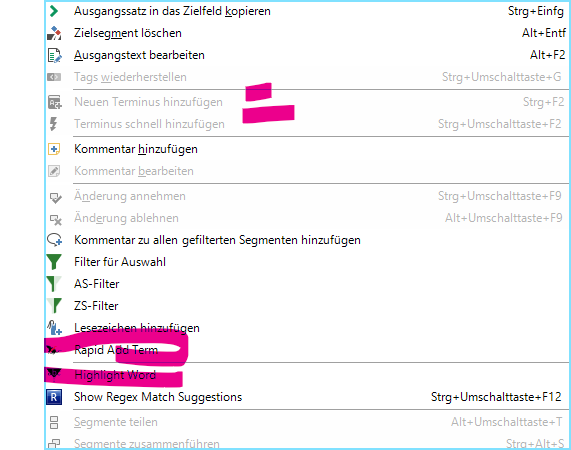
Trados Studio menu with 'Rapid Add Term' option greyed out and not clickable, indicating it is disabled.

Darüber hinaus wird mir die Meldung " Terminologiedatenbankansicht wurde dektiviert" angezeigt. Was soll das? Hier wurden keine Änderungen vorgenommen.


Generated Image Alt-Text
[edited by: Trados AI at 5:18 AM (GMT 0) on 29 Feb 2024]
emoji
Parents
  • Hi ,

    Please can you check first that the termbase can be added to the project by trying the following:

    1. Remove the termbase and add it again to your project.

    2. Export the terminology into a new empty termbase and add this newly created one.

    3. Try other termbases please, to size down the issue being local with this specific file or more general.

    If the above is successful, please check again the plugin, see if it works alright after that. From my side I am not able to reproduce the issue having Studio SR2 (16.2.9.9198) and Rapid Add Term (2.0.2.1)

    Let me know how it goes please!

    Regards,


    Oana Nagy | Developer Experience | QA Engineer | RWS Group

    emoji
Reply
  • Hi ,

    Please can you check first that the termbase can be added to the project by trying the following:

    1. Remove the termbase and add it again to your project.

    2. Export the terminology into a new empty termbase and add this newly created one.

    3. Try other termbases please, to size down the issue being local with this specific file or more general.

    If the above is successful, please check again the plugin, see if it works alright after that. From my side I am not able to reproduce the issue having Studio SR2 (16.2.9.9198) and Rapid Add Term (2.0.2.1)

    Let me know how it goes please!

    Regards,


    Oana Nagy | Developer Experience | QA Engineer | RWS Group

    emoji
Children
