 Translate



Hi everyone,
Is there a keyboard shortcut for "Clear filter" in the Advanced Display Filter 2.0? I can't seem to find one, and it would be very useful.
Michael
PS: I am using the 2022 Beta (quite happily, I might add)


Hi everyone,
Is there a keyboard shortcut for "Clear filter" in the Advanced Display Filter 2.0? I can't seem to find one, and it would be very useful.
Michael
PS: I am using the 2022 Beta (quite happily, I might add)
I'm afraid not... will need an enhancement request now. I think the ability to navigate around the ADF generally with just the keyboard would also be useful. The only programmed shortcuts are these which I'm sure you found?

Paul Filkin | RWS
Design your own training!
You've done the courses and still need to go a little further, or still not clear?
Tell us what you need in our Community Solutions Hub
For me CTRL+ALT+F6 works.
_________________________________________________________
When asking for help here, please be as accurate as possible. Please always remember to give the exact version of product used and all possible error messages received. The better you describe your problem, the better help you will get.
Want to learn more about Trados Studio? Visit the Community Hub. Have a good idea to make Trados Studio better? Publish it here.


Nice one Jerzy... I didn't realise this was hooked up to the same shortcut as the old display filter in the Review ribbon. Interestingly Alt+F6 also works for me.
Paul Filkin | RWS
Design your own training!
You've done the courses and still need to go a little further, or still not clear?
Tell us what you need in our Community Solutions Hub

Hi Paul
I have just pressed this shortcut intuitively and it worked :)
_________________________________________________________
When asking for help here, please be as accurate as possible. Please always remember to give the exact version of product used and all possible error messages received. The better you describe your problem, the better help you will get.
Want to learn more about Trados Studio? Visit the Community Hub. Have a good idea to make Trados Studio better? Publish it here.


Could CTRL+ALT+F6 be added to the list of shortcuts, so future users could find it when looking there?

Hi all,
I use Alt+R, which I added to the Reset Filters shortcut...
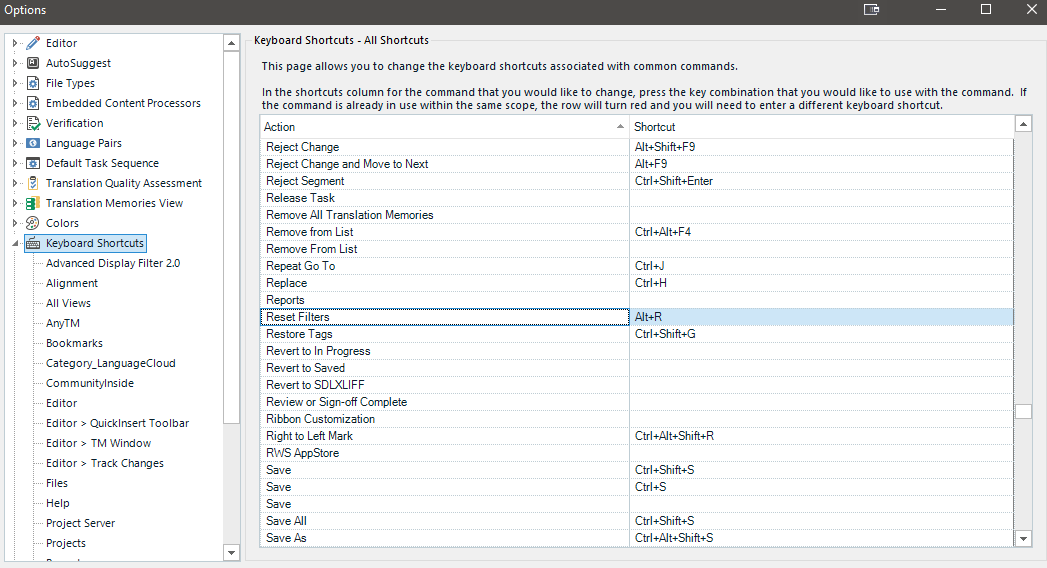
Ali 
Nice... so turns out there's quite a few options!!
Paul Filkin | RWS
Design your own training!
You've done the courses and still need to go a little further, or still not clear?
Tell us what you need in our Community Solutions Hub
Ha ha, Studio is full of surprises.
Ha ha, Studio is full of surprises.
And these are mostly positive 
_________________________________________________________
When asking for help here, please be as accurate as possible. Please always remember to give the exact version of product used and all possible error messages received. The better you describe your problem, the better help you will get.
Want to learn more about Trados Studio? Visit the Community Hub. Have a good idea to make Trados Studio better? Publish it here.