


Different views of Tag`s

Hello,
We have many duplicate entries in our TM, where only the Tag`s are different:
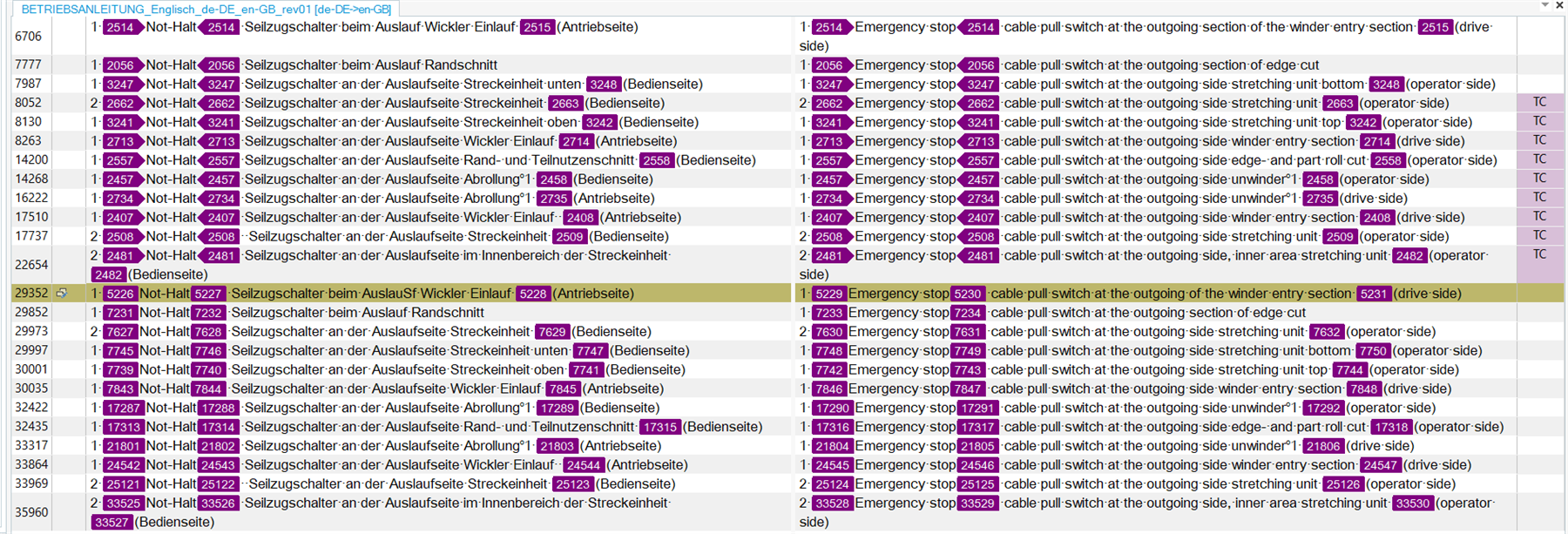
Screenshot of Trados Studio showing a table with duplicate translation units, highlighting the differences in tags by numbers.

When I edit a file in the editor it looks like:

Close-up view of Trados Studio editor with text and tags visible, showing formatting details and tag content.

In the editor I can see what is behind the tags.

But when I want to correct the duplicate entries in the TM directly via Trados Studio interface element labeled 'Translation Memorys' indicating the section to manage translation memories.

I don`t know which of the translation units I can delete, because I don`t see any tag content, only a number.

Many thanks in advance
Harald


Generated Image Alt-Text
[edited by: Trados AI at 10:21 AM (GMT 0) on 29 Feb 2024]
emoji
  •  

    I guess you mean something like this pair:

    Source & target are the same, only the tag IDs differ.  In this situation it probably doesn't make any difference which one you delete... other than each one may provide a Context Match in a different situation.  So if you remove one it's possible you may only get a 100% match for some situations and yet a CM for another.  But if that doesn't matter, then you can remove either of them.

    The reason you can do this is because the TM doesn't hold tag detail, it only holds a placeholder.  That placeholder is replaced by detail in the editor because the detail comes with the source file.  For example:

    I have three different files, a DOCX, HTML and XML.  The content of each tag is different, but when I add the first one to my TM I get a match for the other two as well.  I get a CM as there was only one sentence in this simple example so the context is exactly the same in each case.

    If I select a different entry the TM results window fills my tags with the content of the source:

    and...

    If I select TagID mode I will see different TagIDs in the TM results window, but only in the source.  The end resut will be to make sure that the tags contain the correct content for the file I'm translating.

    This an inherent ability in Trados Studio to ensure you get the maximum possible leverage from your TM.

    Hope that helps?

    Paul Filkin | RWS

    Design your own training!
    You've done the courses and still need to go a little further, or still not clear? 
    Tell us what you need in our Community Solutions Hub

    emoji
  • Thanks for the fast answer, that sounds really good. 
    I will talk with my colleagues and we will try your solution in the next weeks.

    emoji
