


Sequence of xml files in Studio?

We are currently trying to tackle a problem we have with xml files exported from Ixiasoft (DITA). These files all have individual file names that start with a letter combination. Example:

File 1: adt ...
File 2: axy ...
File 3: azt ...

When we set up the project in Studio, they're imported in this alphabetical order. 

The problem is that this order does not correspond to the order they have in Ixiasoft. So we have bits and bobs of each chapter of the manual all over the place in Studio, which is annoying of course. 

Does anyone have any idea where we could look for a solution for this?

THANK YOU!
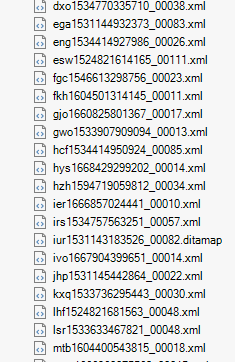
 List of XML files with alphabetical file names displayed in Trados Studio, starting with 'ado1534770335710_00038.xml' and ending with 'mbo160440543815_00018.xml'.


Generated Image Alt-Text
[edited by: Trados AI at 10:52 AM (GMT 0) on 29 Feb 2024]

emoji
Parents Reply
  •  

    Is there any way the script could take the order from the ditamap file that's exported for each translation job (along with the xml source files)?

    Maybe... although it's nothing I've tried to do and I have to get help from AI (ChatGPT for example) to be able to write a script like this in the first place.  So you could try the same thing.  What don't you have a go?  All you'd need to do is tell the program where the location of the folder containing all these files/folders is and then explain how you want it to use the information being read from the ditamap.

    It's a lot easier to do these things than you may think.

    Paul Filkin | RWS

    Design your own training!
    You've done the courses and still need to go a little further, or still not clear? 
    Tell us what you need in our Community Solutions Hub

    emoji
Children
No Data
