
 Translate



Good morning/evening,
I am trying to batch edit a TM (batch deleting of entries created before a specific date), and I'm having the following error (I'm linking the details below):
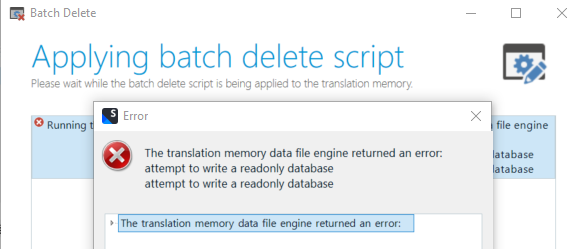
<SDLErrorDetails time="25/04/2023 09:27:16">
  <ErrorMessage>The translation memory data file engine returned an error:
attempt to write a readonly database
attempt to write a readonly database</ErrorMessage>
  <Exception>
    <Type>Sdl.LanguagePlatform.Core.LanguagePlatformException, Sdl.LanguagePlatform.Core, Version=1.6.0.0, Culture=neutral, PublicKeyToken=c28cdb26c445c888</Type>
    <HelpLink />
    <Source>Sdl.LanguagePlatform.TranslationMemoryApi</Source>
    <HResult>-2146233088</HResult>
    <StackTrace><![CDATA[   at Sdl.LanguagePlatform.TranslationMemoryApi.FileBasedTranslationMemoryLanguageDirection.DeleteTranslationUnitsWithIterator(RegularIterator& iterator)
   at Sdl.TranslationStudio.TranslationMemoryManager.BatchDeleteWizard.BatchDeleteJobRequest.RunJob(IJobExecutionContext context)
   at Sdl.TranslationStudio.TranslationMemoryManager.BatchDeleteWizard.BatchDeleteJobRequest.Execute(IJobExecutionContext context)
   at Sdl.Desktop.Platform.Implementation.Services.JobExecuter.Execute(JobData jobData)
   at Sdl.Desktop.Platform.Implementation.ResourceLoggingInternalCommandExecuter`1.ExecuteWithResourceLogging(TCommandData commandData, String message)
   at Sdl.Desktop.Platform.Implementation.Services.Job._worker_DoWork(Object sender, DoWorkEventArgs e)
   at System.ComponentModel.BackgroundWorker.OnDoWork(DoWorkEventArgs e)
   at System.ComponentModel.BackgroundWorker.WorkerThreadStart(Object argument)]]></StackTrace>
  </Exception>
  <Environment>
    <ProductName>Trados Studio</ProductName>
    <ProductVersion>Studio17</ProductVersion>
    <EntryAssemblyFileVersion>17.0.6.14902</EntryAssemblyFileVersion>
    <OperatingSystem>Microsoft Windows 10 Entreprise</OperatingSystem>
    <ServicePack>NULL</ServicePack>
    <OperatingSystemLanguage>1036</OperatingSystemLanguage>
    <CodePage>1252</CodePage>
    <LoggedOnUser>NOMERIS\NEVEUR</LoggedOnUser>
    <DotNetFrameWork>4.0.30319.42000</DotNetFrameWork>
    <ComputerName>P100713</ComputerName>
    <ConnectedToNetwork>True</ConnectedToNetwork>
    <PhysicalMemory>8190240 MB</PhysicalMemory>
  </Environment>
</SDLErrorDetails>
I have tried upgrading the TM, and also exporting and reimporting the data into a new TM, but to no avail.
I am using Trados Studio 2022 - 17.0.6.14902.
Is there something I could do to fix or work around this issue?
Many thanks for your help,
Romain
Generated Image Alt-Text
[edited by: Trados AI at 10:52 AM (GMT 0) on 29 Feb 2024]


