 Translate



The find window is stuck behind the SDL Trados window. Most likely due to a multiple screen issue.
I cannot fix it


The find window is stuck behind the SDL Trados window. Most likely due to a multiple screen issue.
I cannot fix it
Hello,
Based on your query, it seems like you're having trouble with the "Search and Replace" window in Trados Studio. Here are some steps you can follow to resolve this issue:
Step 1: Reset Window Layout
You can restore the dialogs/windows to their default locations in Trados Studio by selecting View > Reset Window Layout from the ribbon. This should bring the "Search and Replace" window back to its original position.
Step 2: Update Your Software
If you're using Parallels and it's not the latest version, consider updating/upgrading to the latest version. This could potentially resolve any multiple screen issues you're experiencing.
Step 3: Reset Trados Studio
If the above steps don't work, you might need to reset Trados Studio. Please note that this should be your last resort as it will reset all your settings to their default state. To do this, follow the instructions provided in the Trados Studio documentation or help center.
Remember, it's always a good idea to keep your software up to date to avoid such issues. If the problem persists, you may want to consider reaching out to RWS Support for further assistance.
Best regards,
RWS Community AI


Hi,
I got the same issue and could not fix it on one of my computer.
What is strange is that Ctrl+G works and the corresponding windows pops up, but do not open a windows on the taskbar, while Ctl+F and Ctrl+H do not pop up, but open a window on the taskbar I cannot locate. Alt+Tab shows a windows is there empty and it I go to it, nothing shows up. I tried repair and did not get any change.
I tried also not to use any extended display. No change.
Can anyone help me?

I got a solution to my problem.
I still do not have a good understanding of why?
I reloaded a backup image and also reloaded Trados Studio by relauching the installer.
The issue was no longer there, but the image was setup such that the extended display was configured with the laptop display as the main display.
After I switched such to get my external monitor made the main display, the search and replace windows went unavailable again.
I reverted that and I now can do my work and use the search and replace windows as normal.
It is not my preferred setup for the extended display, but at least I can work with that.
Anyone having this strange behavior?

I fixed it the way I liked, working on the external display.
In this configuration, for whatever reason, Trados sent the "Search and Replace" window in the laptop display where it could not be scaled properly (my Dell was 2304x 1536 pixels 150% scale. my laptop was 2560 x 1440 pixels 125% scale).
The solution is to set the laptop as the main display, get the popup windows to open in the same display, switch to the external monitor at the main display get the popup windows to open in the laptop, locate it with Alt+tab and move it to the external monitor.
I wish Trados would manage high resolution display better.

Hi Paul Patruno
Maybe this community post helps for the next time:
If, when you look at the toolbar, an empty white rectangle pops up from the toolbar if you hover your mouse cursor over the Studio icon, as in the image below, this means that the Find & Replace dialog has somehow moved off-screen...
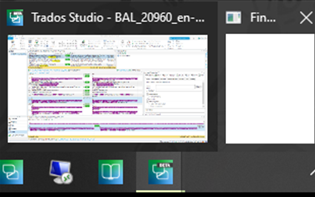
If so, first right-click on the white rectangle, then left click on 'Move' on the popup context menu that appears.
A 'Move' icon (multidirectional arrow) icon will appear. Press the appropriate arrow key on your keyboard to move the dialog box back on-screen. Keep pressing until the Find & Replace dialog is fully back on screen.
So, if the 'Move' icon appears at the top, click the 'down' arrow. If it appears at the bottom, click the 'Up' arrow on your keyboard, left>right or right>left... and keep pressing.
Maybe, this helps.
Best regards
Seraina
Thank you, I was going crazy trying to find the find and replace window!

